

A reusable client workflow should preserve decisions your team makes repeatedly. It should not copy every detail from the last client and pretend the next engagement will be identical.
The distinction matters because client work contains several kinds of structure. Intake questions, task plans, file organization, recurring deadlines, and account settings each change for different reasons. Putting all of them into one master template makes exceptions harder to see and updates harder to control.
The better rule is: standardize the stable layer, then review the client-specific layer before work begins.
Match the template to the decision
Start by naming what your team wants to reuse. Each reusable structure should have one clear responsibility:
| Reusable structure | Standardize this | Review for each client |
|---|---|---|
| Request template | Questions, fields, helper text, required answers, and conditional paths | Audience, due date, wording, and which branches apply |
| Task template | Sections, tasks, subtasks, relative due dates, visibility, and supported attachments | Assignees, actual dates, priorities, and client access |
| Default Files structure | The folders and supported files every new account should start with | Account-specific access and engagement folders |
| Repeating Task | A work item that returns on a defined cadence | Whether the next occurrence is still needed and who owns it |
| Account duplication | Selected setup from a similar client account | Membership, permissions, copied content, and excluded history |
| API or Zapier action | A supported action triggered by a verified event in another system | Identifiers, permissions, error handling, and the result before client access |
This separation keeps the template understandable. It also gives your team a clear place to make an exception without rebuilding the entire workflow.
Use Request templates for repeatable intake
A Request template stores the structure of a client-facing form. In Sydnee Requests, that can include fields, choices, helper text, required states, and supported conditional rules.
Use one when the information you collect repeats, even if the answers do not. A marketing agency might keep separate Request templates for paid media access, website discovery, and quarterly campaign planning. The team can choose the relevant template, assign the right portal audience, adjust the wording, and set the actual due date before publishing.
The template does not choose the client or send itself. It gives the team a reviewed starting point. Review Request templates, then use the client information Request workflow for the audience, publishing, reminder, and response-review decisions that still happen after the structure is selected.
Use Task templates for the work plan
A Task template stores a reusable plan for completing work. In Sydnee Tasks, it can include sections, tasks, subtasks, relative due dates, visibility settings, and supported attachments.
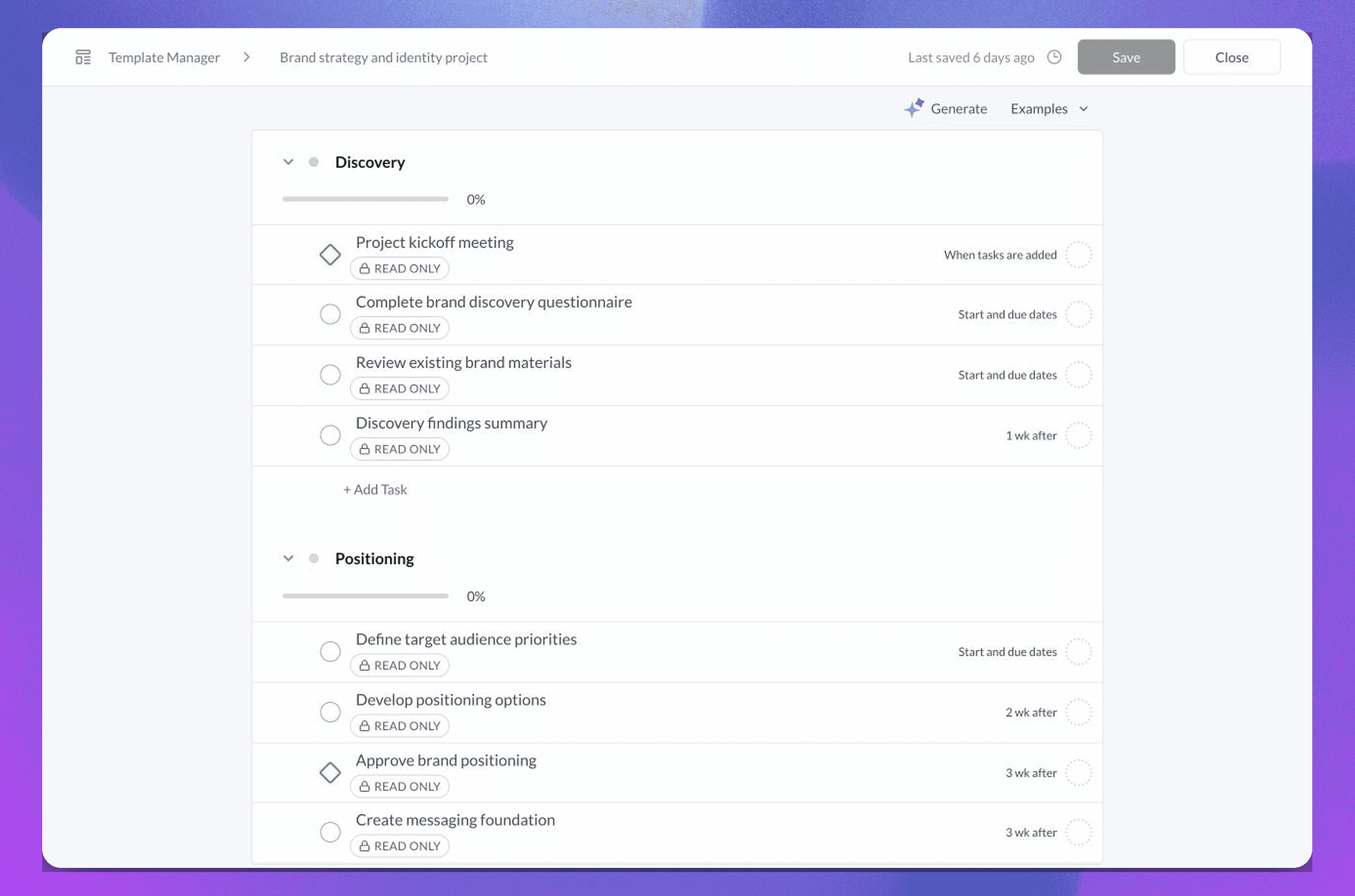
Build the template around stages your team can recognize. For a campaign launch, those stages might be preparation, internal review, client review, and launch checks. Write task titles that describe an observable outcome, then add the context someone needs to complete it.
When your team inserts the template into a client account, review the actual assignees, dates, priorities, and client visibility. Relative dates help position work, but they do not decide whether the schedule is realistic for that engagement.
Request templates and Task templates solve different problems. A Request collects structured inputs. A Task gives an action an owner and a state. Sydnee does not treat a completed Request as an automatic instruction to create a Task.
Prepare new accounts with a default Files structure
A default Files structure is the workspace-level folder setup copied into newly created client accounts. It is useful for folders that every account should receive, such as Client uploads, Working files, and Final work.
Keep this structure broad. Service-specific folders can be added after you know what the client bought. A large hierarchy built for every possible engagement creates empty destinations and makes the useful folders harder to identify.
The default module and Files structure prepares new accounts. It does not replace the Files layout in existing accounts, and the team still needs to confirm client access for the new workspace.
Reserve repeating Tasks for work that repeats
A repeating Task creates its next occurrence when the current occurrence is completed and Sydnee can calculate the schedule. It can support work with a daily, weekly, biweekly, monthly, or yearly cadence.
That makes it a fit for one recurring responsibility, such as requesting a monthly performance summary or reviewing a quarterly account plan. It is not a calendar that creates every future occurrence in advance.
Use a Task template when several related tasks form a reusable plan. Use a repeating Task when one responsibility should return after completion. The month-end close workflow shows how reusable task structure and recurring client inputs can work together without removing professional review.
Duplicate an account selectively
Account duplication can create a new client account from selected content and setup in an existing account. Current choices include supported dashboard setup, Files and Deliverables, Tasks, Service Showcase state, custom pages, team members, and portal members.
This is useful when two client accounts need more than the same blank templates. It also requires a closer access review. Copying portal members gives those contacts access to the new account, so membership should never be included by habit.
A duplicated account is not a backup or historical clone. Requests, task comments, file comments, file history, account activity, and event history are excluded. Use account duplication for selected working structure, not for preserving a record of the original engagement.
Automate only a supported starting action
Templates reduce setup inside Sydnee. The public application programming interface (API) and Zapier can connect supported actions to events in another system.
Current public API workflows include creating an account, adding a portal user, sending a Request from a template, and adding a Task template to an account. Zapier supports no-code workflows through its current published actions. Review the Zapier setup guide and verify the live contract before designing around either option because supported resources and actions can change.
The boundary is important. Sydnee does not provide one universal automation that turns a Request into a Task and then publishes a Deliverable. Your integration can perform the actions supported by the current API surface, but your team still owns the business rules, identifiers, permissions, error handling, and review.
Final delivery also remains deliberate. A team member prepares a folder and publishes it as a Deliverable when the work is ready. Completing the last Task does not publish the folder automatically.
Build a modular client workflow
Consider a team that runs a recurring campaign engagement:
- A new account receives the default Files structure
- The team sends a campaign intake Request from the appropriate template
- A Task template creates the reviewed work plan in the client account
- Individual repeating Tasks create their next occurrence after completion where the cadence calls for it
- An API or Zapier action starts a supported step when a verified external event occurs
- The team reviews the final files and publishes the finished folder as a Deliverable
The modules are connected by an operating process, not by an invisible state machine. That gives your team a chance to check the client, scope, dates, access, and output at each boundary.
Audit templates as operating assets
Reusable structures need owners. For each Request template, Task template, default folder structure, or integration, record:
- What event should make the team use it
- Which details are stable enough to reuse
- Which fields must be reviewed for every client
- Who can change the source template
- Which active workflows need an update after the template changes
- What should happen when an automated action fails
A template should make the expected path visible while leaving room for judgment. If your team cannot explain what the template standardizes and what it deliberately leaves open, the template is carrying too much.
Map the handoffs with the connected client portal workflow, then review the current Task template and repeating-task behavior before updating a live template.







