Gradient background pattern

Turn Your Client Portal Into a Passive Upsell Engine

Display your services beautifully, track client interest, and get instant notifications when clients want to upgrade—all without sales pressure.

Sydnee customerSydnee customerSydnee customerSydnee customer

Used by 2,000+ agencies & freelancers

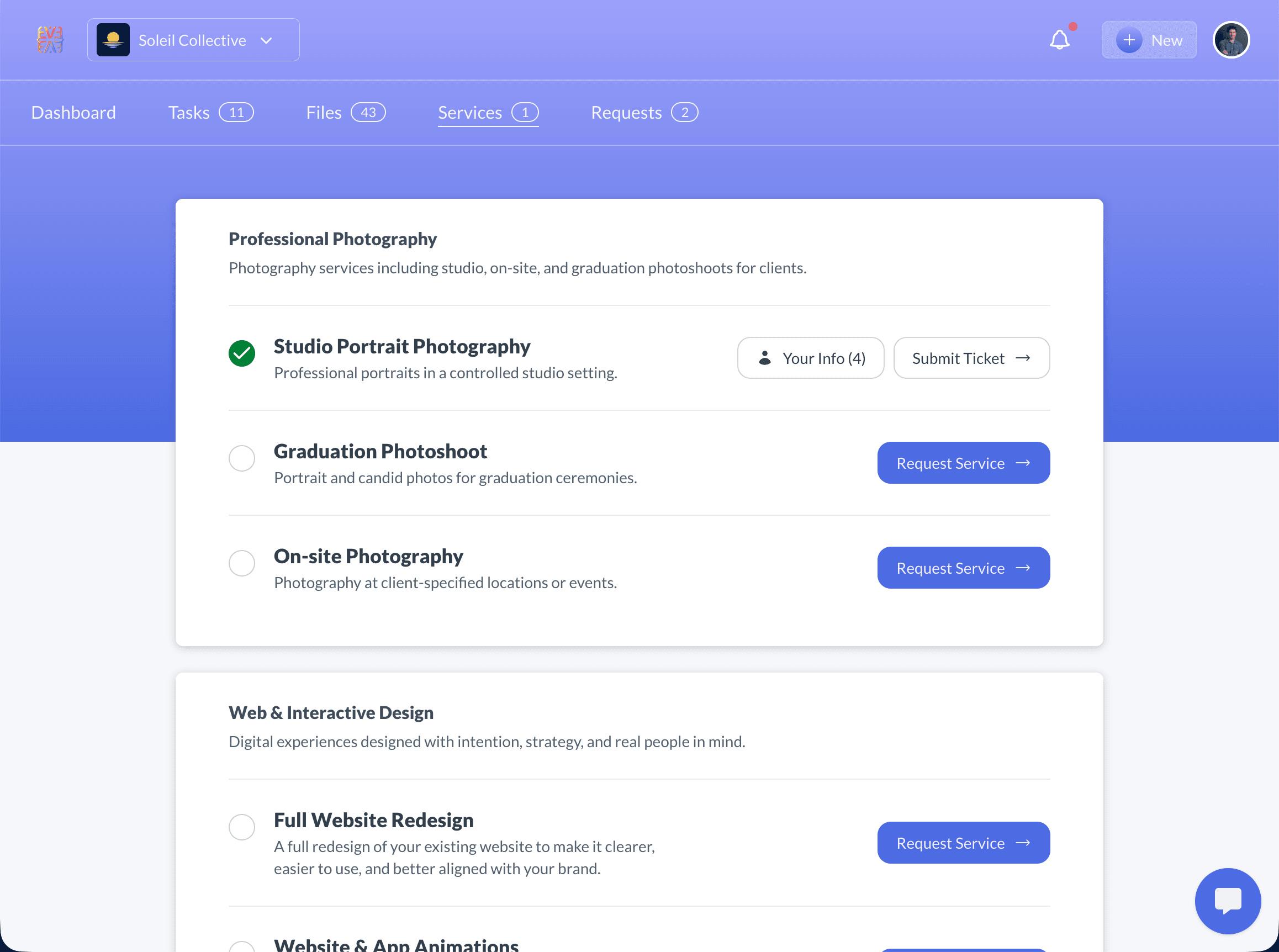
Service showcase dashboard displaying organized service categories with active and available services for clients

12 Powerful Features

Everything you need to showcase services professionally

From organized categories to built-in upsell capture—a complete service catalog designed for client-facing teams.

Category Organization
Service Management
Custom Detail Fields
Per-Client Activation
Drag & Drop Ordering
Request Service Button
Marketing URL Links
View as Client Preview
Auto-Hide Empty Fields
Global Templates
Real-Time Updates
Service Details Modal

Organize Services by Category

Structure your offerings the way your business works.

Two-Level Hierarchy

Create categories like "Marketing" or "Web Development", then add individual services within each. Clients see a clean, organized view of everything you offer.

Drag & Drop Everything

Reorder categories, services, and even detail fields with intuitive drag-and-drop. Put your most important offerings front and center.

Global Templates

Define your service catalog once, then customize visibility per client. Add a new service and it's instantly available to activate for any client.

Per-Client Control

Same Catalog, Personalized for Each Client

Toggle services on or off per client with a single click. Client A sees 5 active services while Client B sees 3—all from the same master template.

Active Services

Shows "Your Info" button

  • Displays service details
  • Shows on client dashboard
  • Links to marketing pages

Inactive Services

Shows "Request Service"

  • Passive upsell opportunity
  • Instant notifications
  • No sales pressure
Per-client service activation showing personalized service toggles for each client

Custom Service Details That Auto-Hide

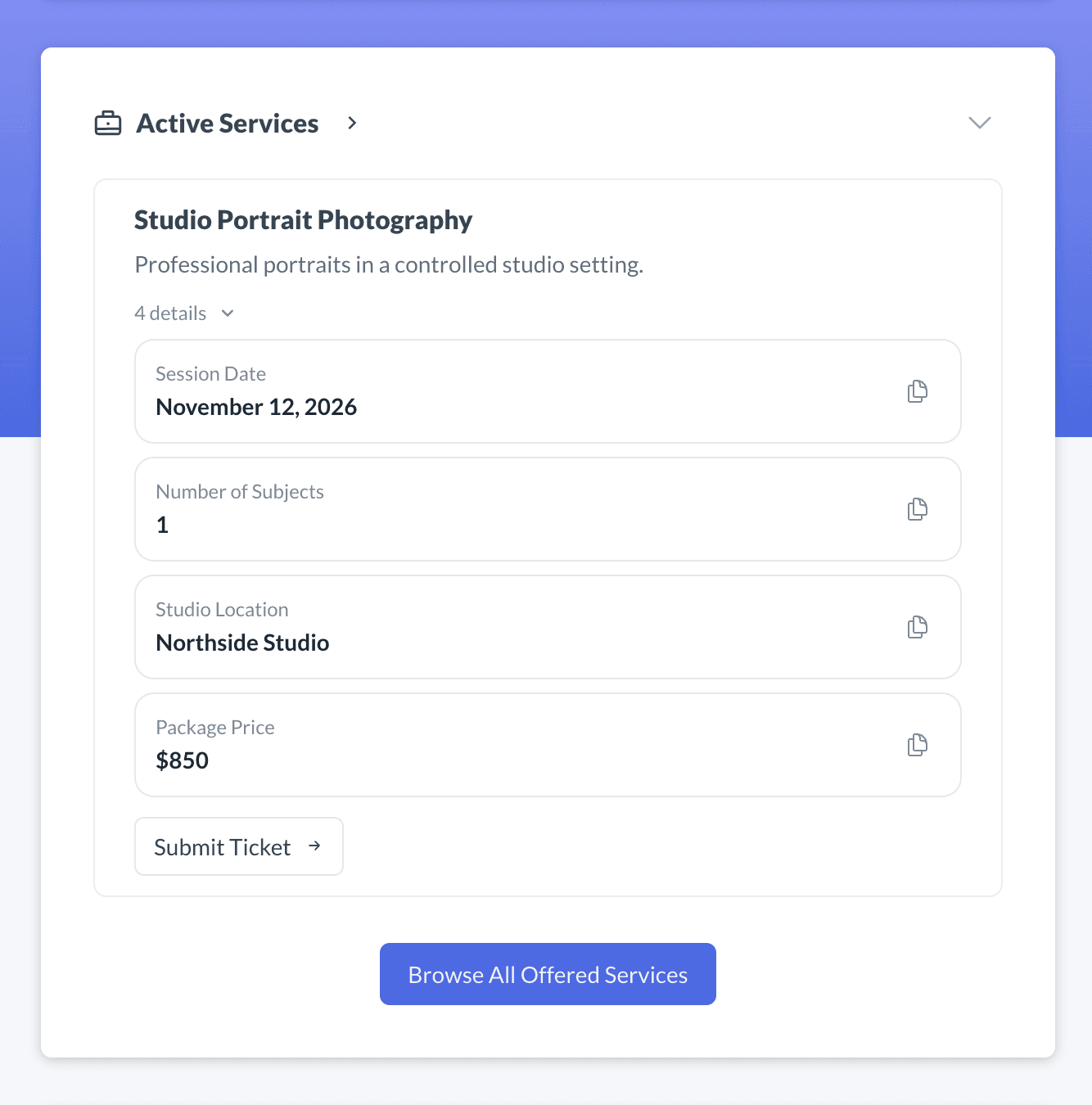
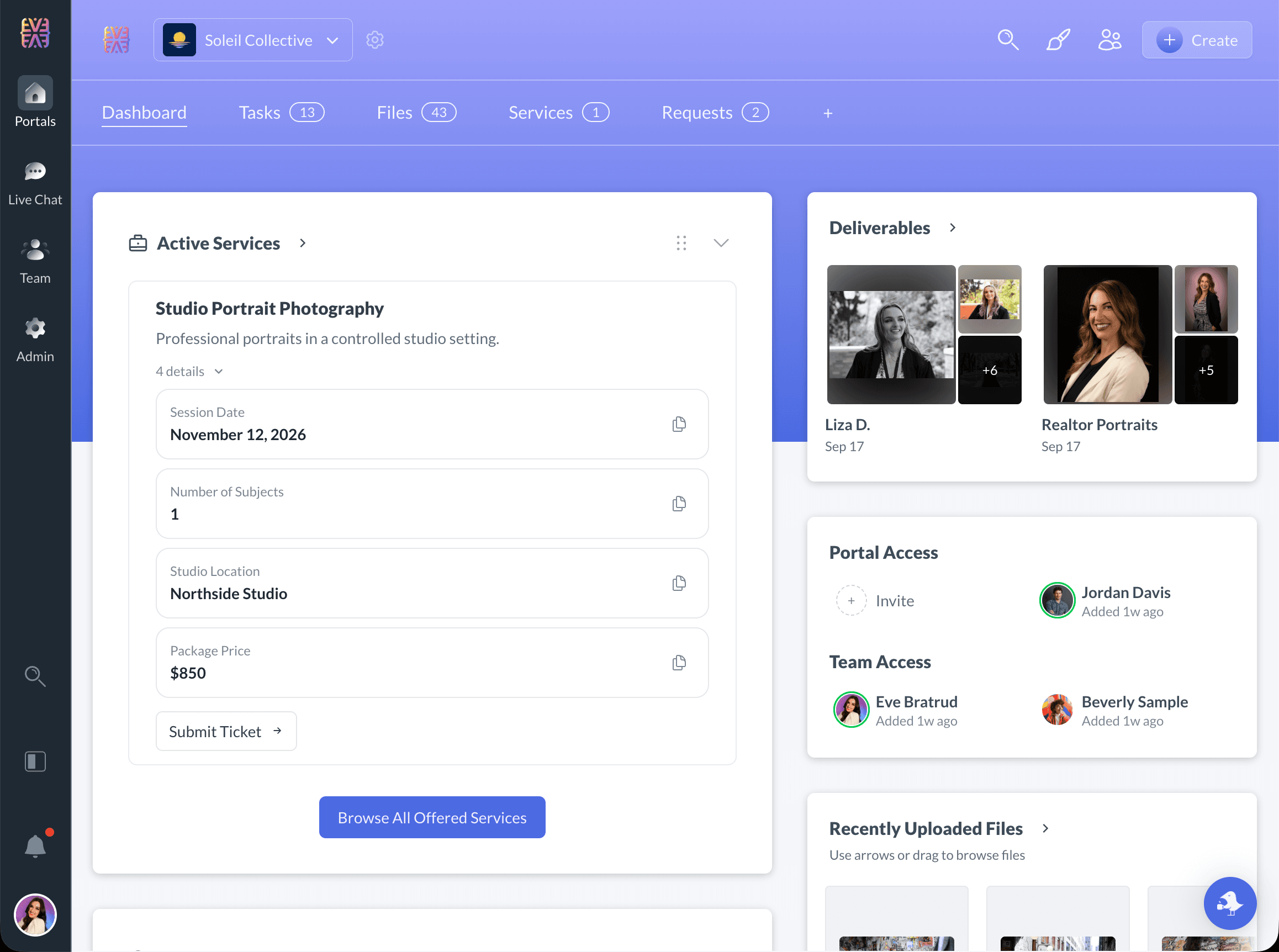
Add any information clients need—pricing, deadlines, logins, requirements—and only show what's relevant.

  • Flexible detail fields—add custom fields for any service information
  • Auto-hide empty values—clients only see fields with content
  • Clickable URLs—links automatically become interactive
  • Reorderable details—drag to prioritize important info

💡Pro Tip: Clients access their details via the "Your Info" button on active services—keeping their dashboard clean while making info accessible.

Service details modal showing custom fields like pricing, deadlines, and login credentials
Built-in Upsell

Capture Client Interest Automatically

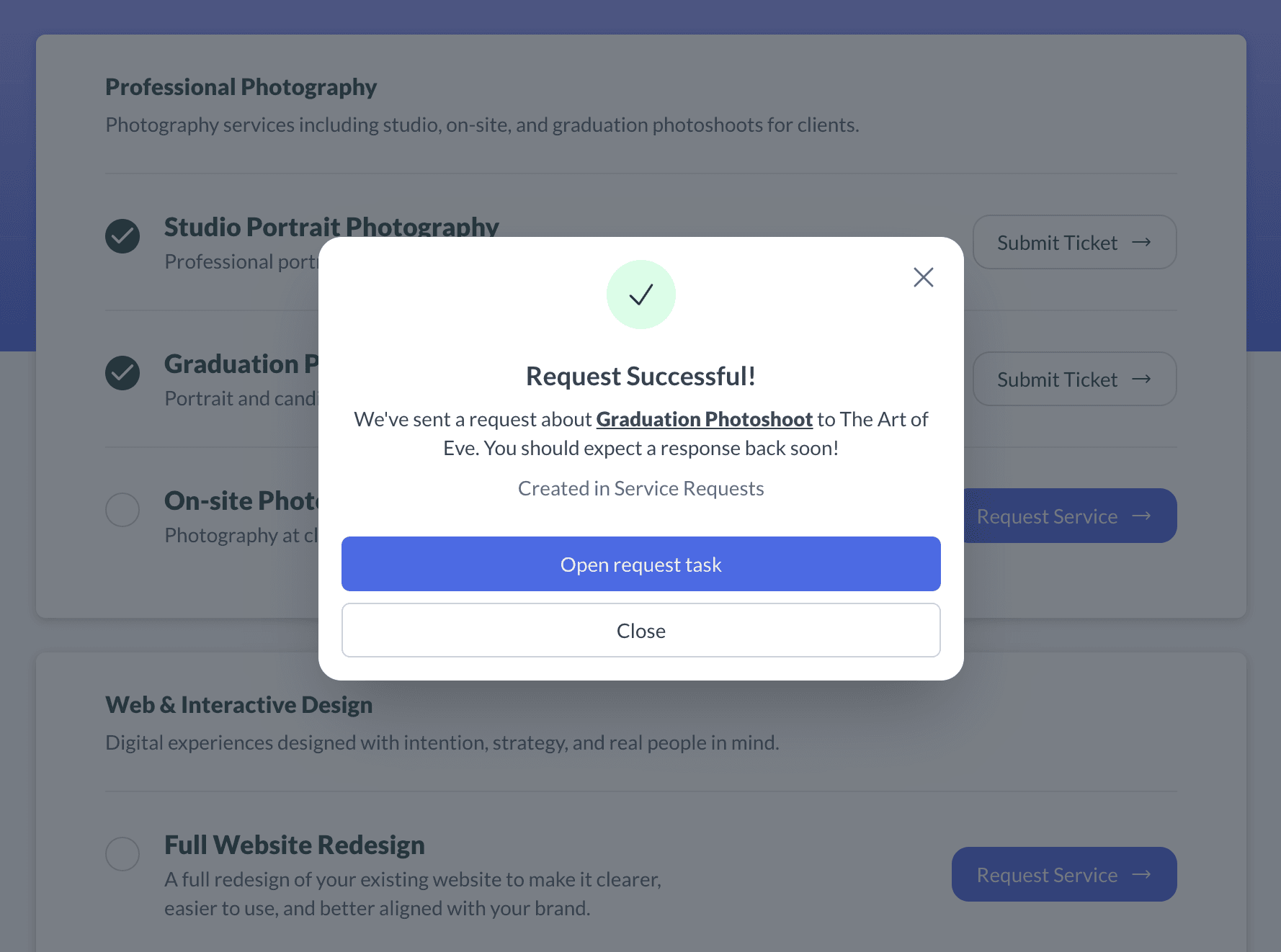
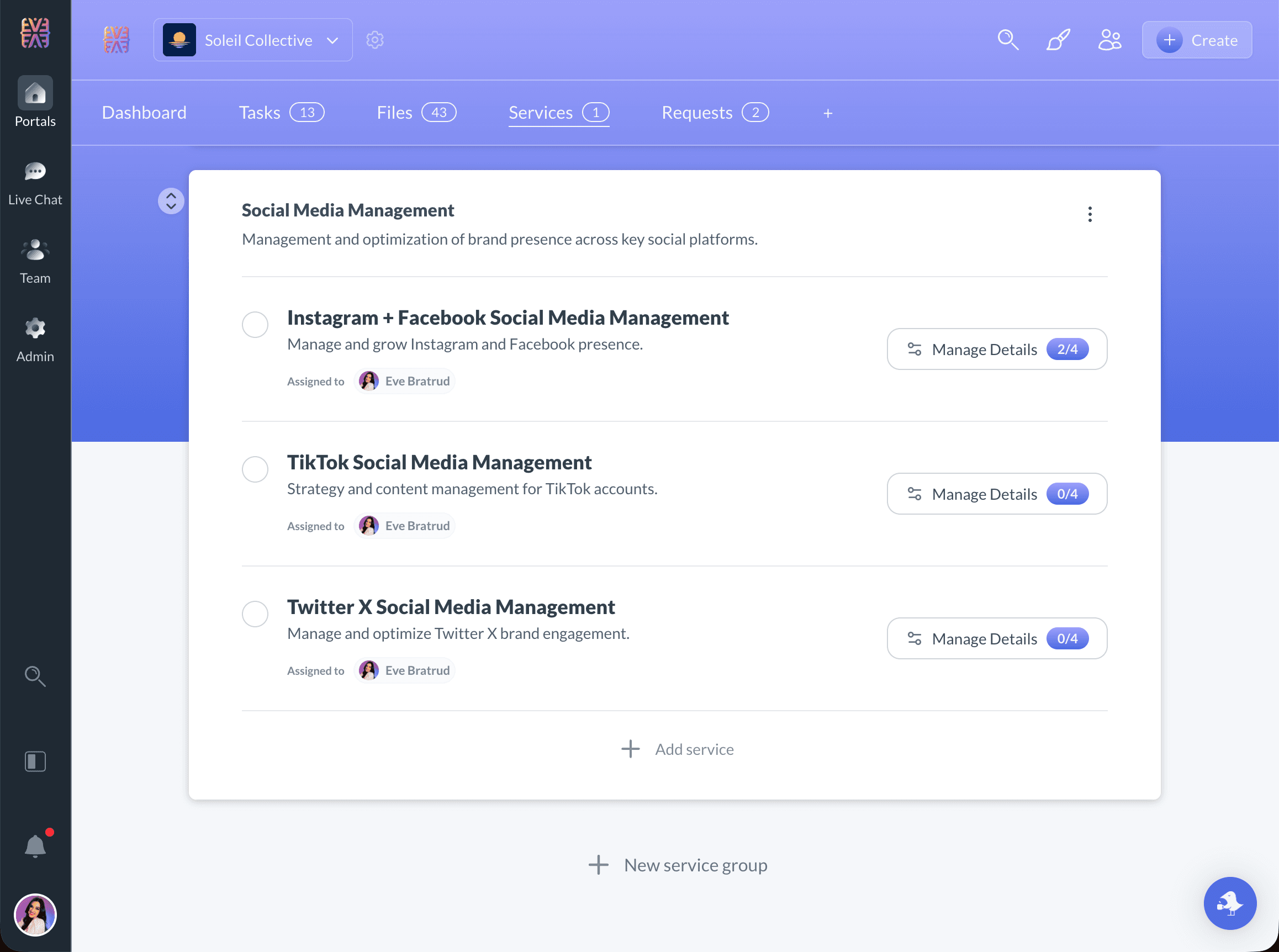
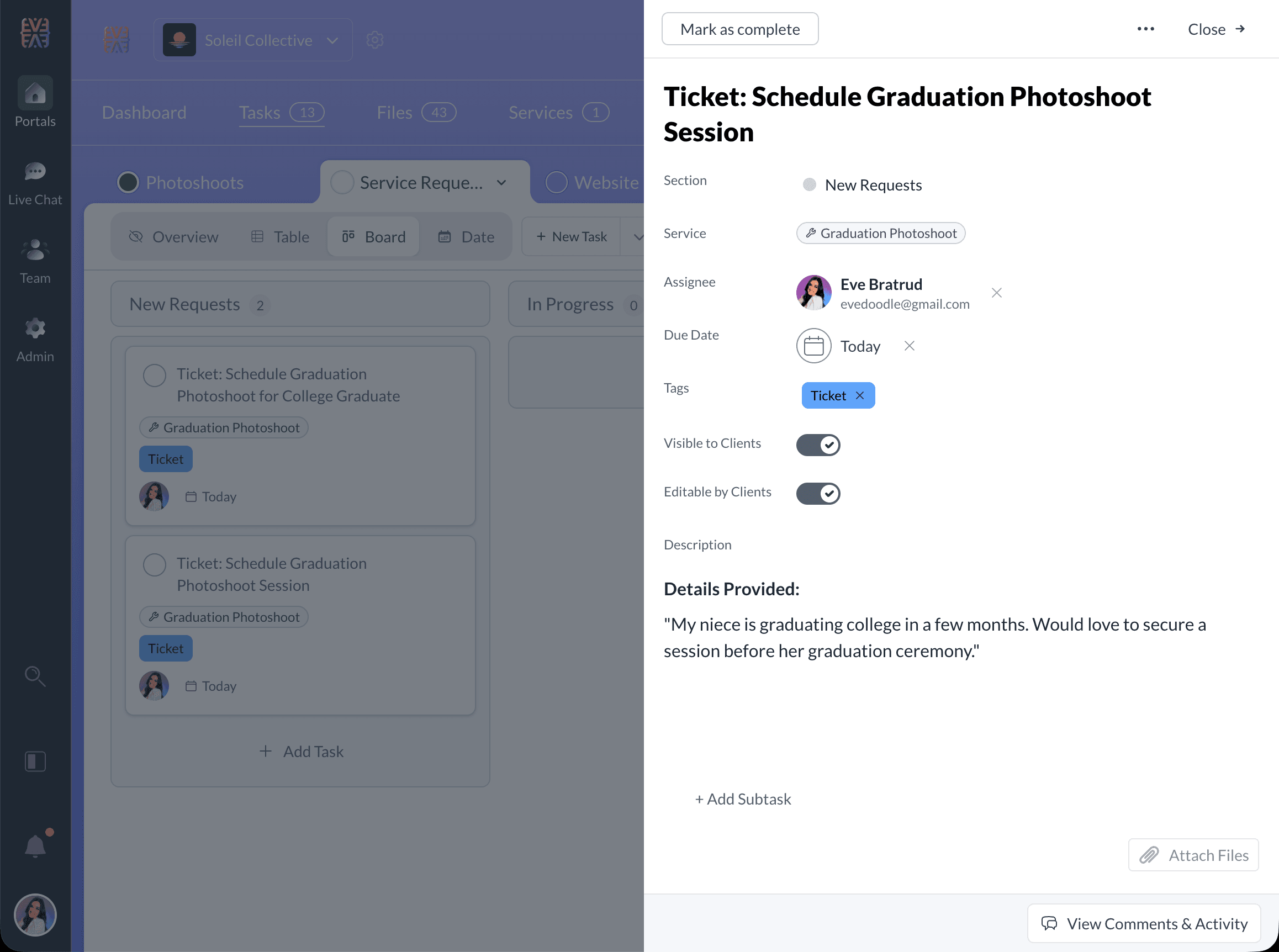
When clients browse your services and click "Request Service" on an inactive offering, you get an instant notification. No awkward sales calls—just warm leads delivered to your inbox.

  • "Request Service" button on all inactive services
  • Instant email notification when clients express interest
  • No sales pressure—clients initiate when they're ready
  • "Learn More" links to your marketing pages
Automatic client interest capture with Request Service button and instant notifications
Preview Mode

See Exactly What Your Clients See

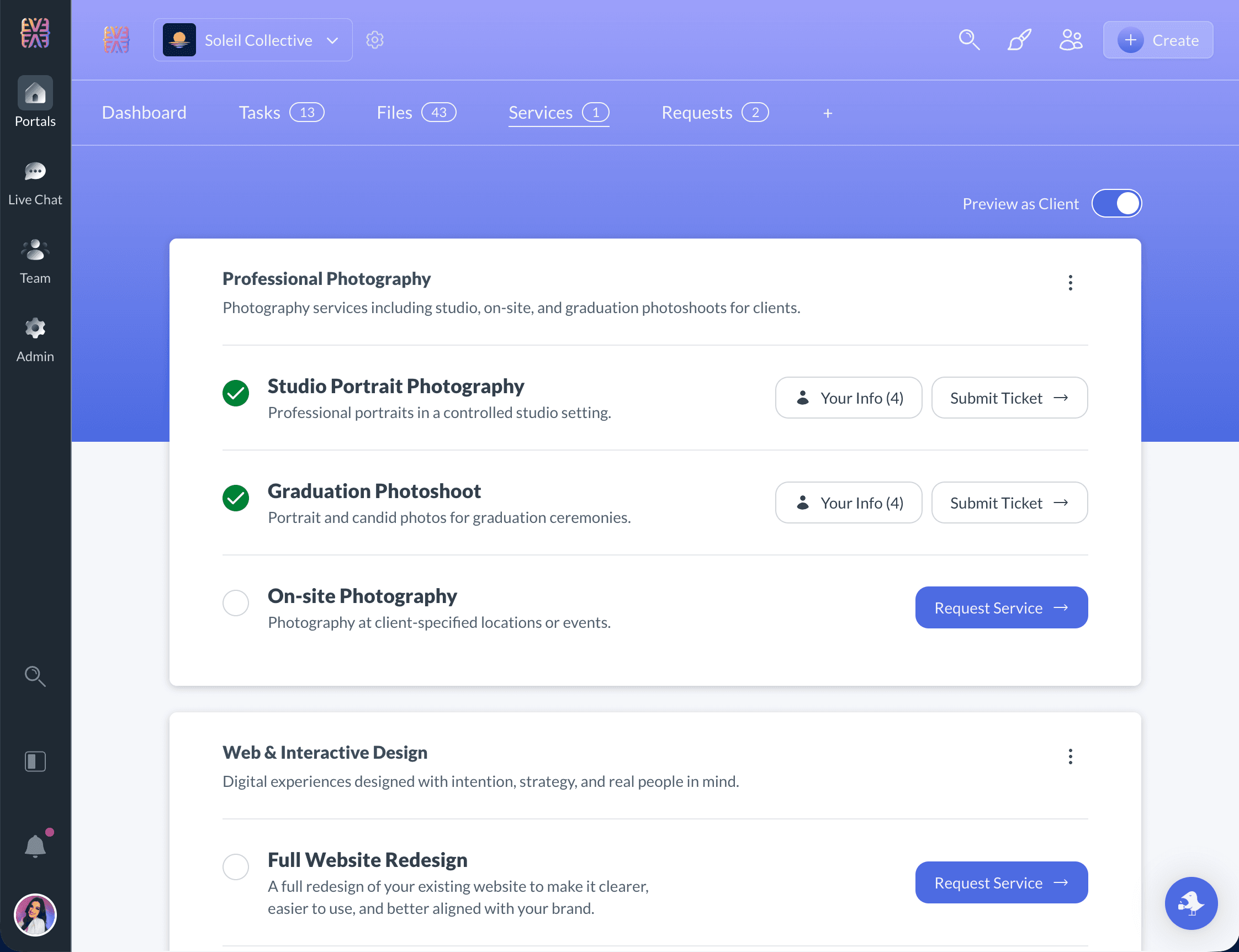
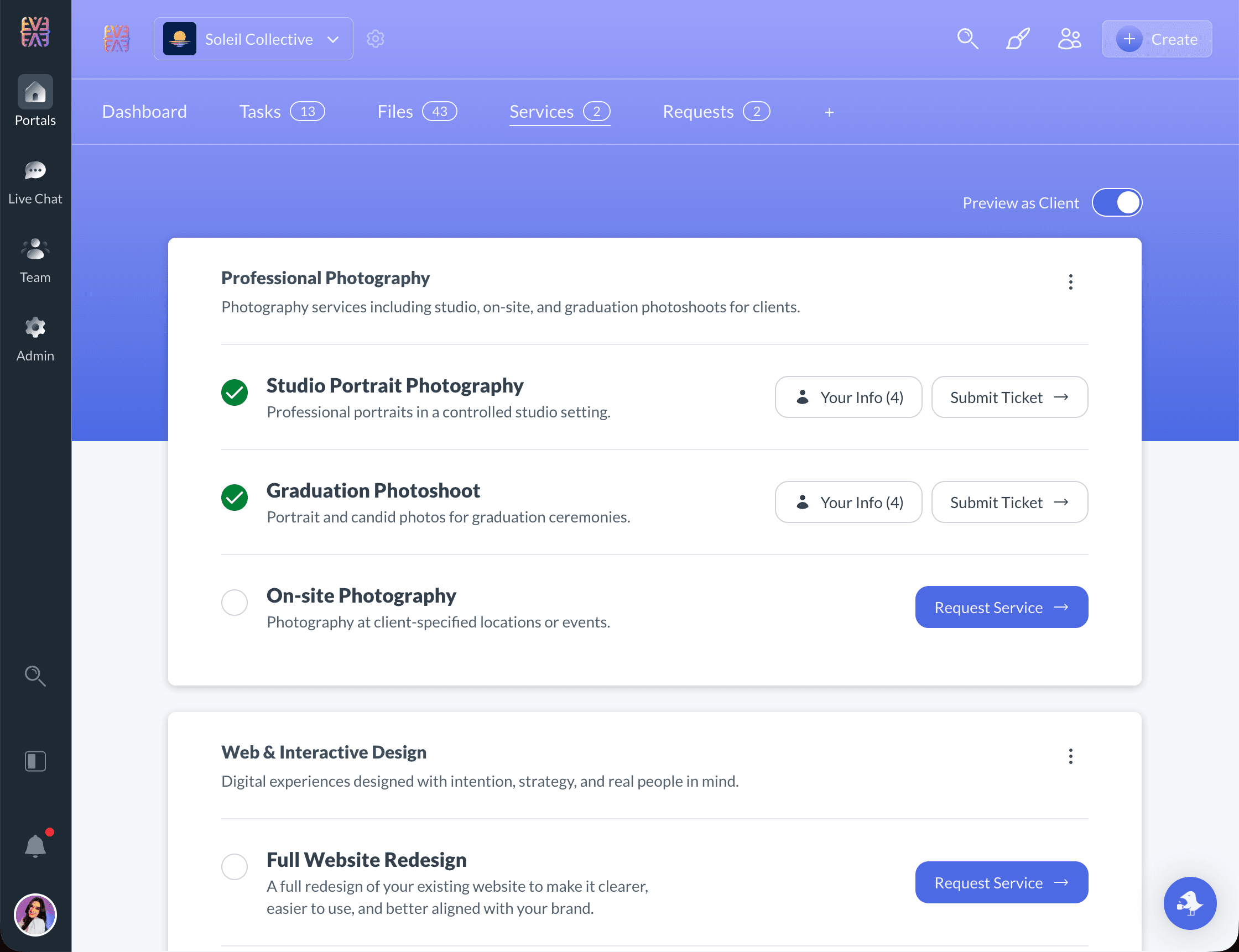
Toggle "View as Client" to instantly preview the service showcase from your client's perspective. Verify active services, check detail fields, and ensure everything looks perfect before they see it.

  • One-click toggle between admin and client view
  • Verify which services appear active vs. requestable
  • Test "Your Info" and "Learn More" buttons
  • Confirm empty fields are hidden as expected
View as Client preview mode showing exactly what clients see in their service showcase

Built for Your Industry

Service showcases that fit how you work

See how teams across industries use Sydnee to display services, capture interest, and grow client relationships.

Consultants & Advisors

Strategy, Operations, Business Consulting

  • Display monthly retainer packages
  • Showcase add-on consulting services
  • Track active engagements per client
  • Enable passive service upgrades

Marketing Agencies

Digital Marketing, SEO, PPC

  • Show active campaign types
  • Display available marketing channels
  • Link to service landing pages
  • Capture interest in new services

Consultants & Coaches

Business Coaches, Strategy Consultants

  • Present coaching packages
  • Display workshop offerings
  • Show program tiers clearly
  • Enable package upgrades

IT & Tech Services

MSPs, Web Development, SaaS

  • List managed service tiers
  • Show development capabilities
  • Display support packages
  • Track active subscriptions

Training & Education

Corporate Trainers, Course Creators

  • Display course catalog
  • Show available certifications
  • Present training programs
  • Enable course enrollment requests

Home & Trade Services

Contractors, Property Managers

  • List service offerings by category
  • Display maintenance packages
  • Show specialty services
  • Capture new project requests

Frequently Asked Questions

Everything you need to know about Sydnee Service Showcase

How do I organize my services in Sydnee?
Sydnee uses a two-level hierarchy: Categories and Services. Create categories to group related offerings (e.g., 'Marketing' or 'Web Development'), then add individual services within each category. Both categories and services support drag-and-drop reordering for complete control over how clients see your offerings.
Can clients see services that aren't active for them?
Yes! Inactive services display a 'Request Service' button, creating a passive upsell opportunity. When clients click this button, you receive an instant notification of their interest. You can also hide specific services from certain clients if needed.
How do service requests work?
When a client views an inactive service, they see a 'Request Service' button. Clicking it sends you an instant notification with the client's name and the service they're interested in. This creates a natural, pressure-free way for clients to express interest in expanding their engagement.
Can I customize which services each client sees?
Absolutely. While you define services globally once, you can activate or deactivate any service for each individual client. This means Client A might see 5 active services while Client B sees 3—all from the same master template.
What happens to empty service detail fields?
Empty detail fields automatically hide from the client view. This keeps the interface clean—clients only see information that's relevant to them. You can add details like pricing, deadlines, or login credentials, and they'll only appear when you fill them in.
Can I link to external marketing pages for each service?
Yes! Each service supports a 'Learn More' marketing URL. When set, clients see a link that takes them to your website, landing page, or any external resource with more information about that service.
How do I preview what clients will see?
Use the 'View as Client' toggle to instantly see exactly what your client's service showcase looks like. This lets you verify that the right services are active, details are correct, and the presentation matches your expectations before the client sees it.
Are service changes reflected immediately?
Yes, all changes are saved in real-time with auto-save functionality. When you update a service name, reorder categories, or toggle a service active/inactive, clients see the changes immediately in their portal.

Why agencies choose Sydnee over static PDFs

Static PDFs

Document sharing

Free but costly
  • Static documents clients lose or ignore
  • No way for clients to request services directly
  • Manual updates required for each client
  • No visibility into client interest or intent
  • No organization by category or hierarchy
  • Disconnected from your client portal

Sydnee

All-in-one portal

$30/mo
  • Dynamic catalog always up-to-date in client portal
  • Built-in 'Request Service' button for passive upsells
  • Per-client activation with a single toggle
  • Instant notifications when clients express interest
  • Organized categories with drag-and-drop ordering
  • Integrated with tasks, files, chat, and requests
Try Sydnee Free for 5 Days

No credit card required

Sydnee

Try Sydnee Client Portals Today

Client & team live chat
Built in task manager
Showcase services in your portal
Easy client onboarding & info requests
Secure file storage & sharing
Embed Calendly, Figma, Loom, Google Looker & more
Custom domain & full white labeling
Unlimited client & teammate seats
No credit card required

Simple Pricing.

Get 100% setup and implemented before ever pulling out the credit card.

Standard

per month

Start free trial
  • All features included
  • 1,000 Accounts
  • 1TB Storage
  • Unlimited teammates & client seats
  • Custom domain + email white-label
  • API + Zapier Access

Premium

per month

Start free trial
  • Everything in Standard
  • Priority Support
  • 10,000 Accounts
  • 3TB Storage
  • Sydnee turned our onboarding into a simple, repeatable process that just works.

    Patrick Benske, Benske Agency, Founder
    Patrick Benske
    Benske Agency, Founder
  • Whether you're tech savvy or not, this is gonna work for you, and it's so simple, anyone can use it.

    Steven Diamond, Diamond Ai Media Group, Founder
    Steven Diamond
    Diamond Ai Media Group, Founder
  • Between the white-labeling, templates, and client collaboration, Sydnee covers everything we used to patch together across other tools.

    Carmelo Santos, Co-found Council of Marketers
    Carmelo Santos
    Co-found Council of Marketers
  • It's so nice to have everything in one place—clients can see our progress, and we can see every task at a glance

    Michael Rapino, HoneyQuill Agency, Founder
    Michael Rapino
    HoneyQuill Agency, Founder
  • Sydnee has been the best investment I've made for my agency thus far. There is not better platform with the features included for the price point they are at.

    Luis Leon, Promise Pixel, Founder
    Luis Leon
    Promise Pixel, Founder
  • Sydnee offers our Clients a clean simple platform that is easy to understand and navigate.

    Laura McDermott, Owner, Mcdermott Law Firm, PLLC
    Laura McDermott, Owner
    Mcdermott Law Firm, PLLC