Gradient background pattern

Client Intake Forms Built for Ongoing Client Work

Collect structured answers, files, and signatures in a branded client portal. Use conditional logic, due-date reminders, and reusable templates while keeping every request tied to the right client account.

Sydnee customerSydnee customerSydnee customerSydnee customer

Trusted by 1,000+ freelancers & agencies worldwide
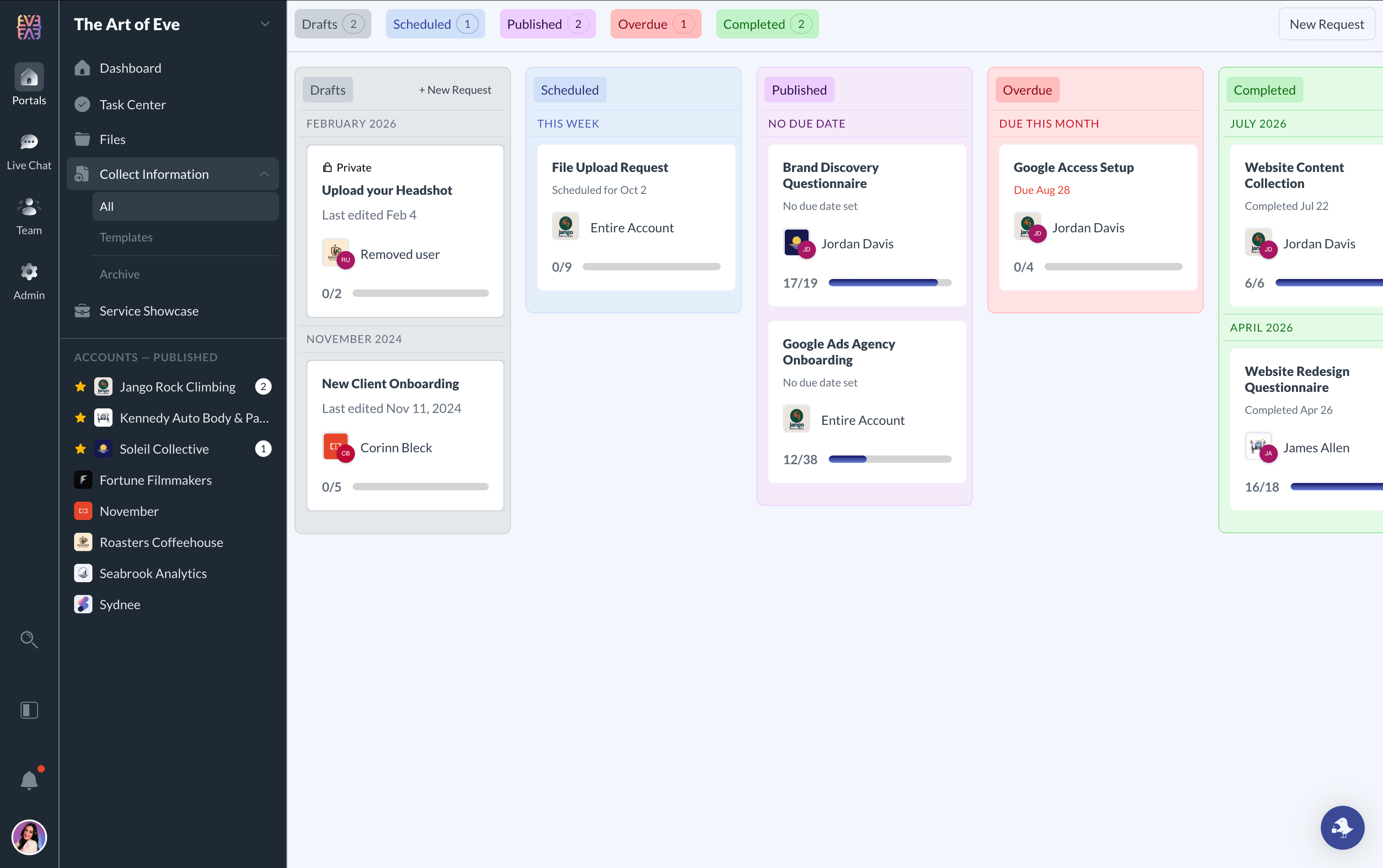
Client request management dashboard with Kanban board showing request statuses

13 Response Fields + Conditional Logic

Build a clear path through client intake

Collect the details your team needs with text, choice, date, upload, color, and signature fields, plus section headings that keep longer requests easy to follow.

Single-line Text
Multi-line Text
Email
Phone Number
URL
Number
Date
Color Picker
Checkbox
Radio Buttons
Dropdown
File Upload
Digital Signature
Section Header

Guided Client Intake

Build dynamic forms that adapt to each client

Turn one static request into a guided intake flow. Show follow-up questions only when they apply, and optionally add extra protection to specific short-text answers when needed.

Conditional Visibility

Ask relevant follow-up questions

Keep requests short for every client by revealing the next field only when a previous answer makes it relevant.

  • Branch onboarding flows based on service selection or client type
  • Reduce overwhelm by hiding irrelevant fields until they matter
  • Preserve the same branching rules when you reuse templates
Sensitive Short-Text Option

Add extra protection to specific answers

If a form needs one especially private text response, you can mark that short-text field as sensitive so it is encrypted at write time and masked by default in standard views.

  • Available for short-text fields when a single answer needs more privacy
  • Useful for identifiers, account details, or similar private text inputs
  • Best paired with private requests when you want tighter access controls

Build the Perfect Request Every Time

Our intuitive drag-and-drop form builder lets you create requests tailored to each client's needs with real-time preview, conditional branching, encrypted short-text fields, and auto-saving.

  • Drag-and-drop builder with live preview and branching logic
  • 13 response field types plus section headings for clear structure
  • Optional sensitive short-text handling for specific answers
  • Show or hide follow-up questions based on earlier responses
Request form builder with drag-and-drop fields
Signature Field

Capture Signatures Right in Your Forms

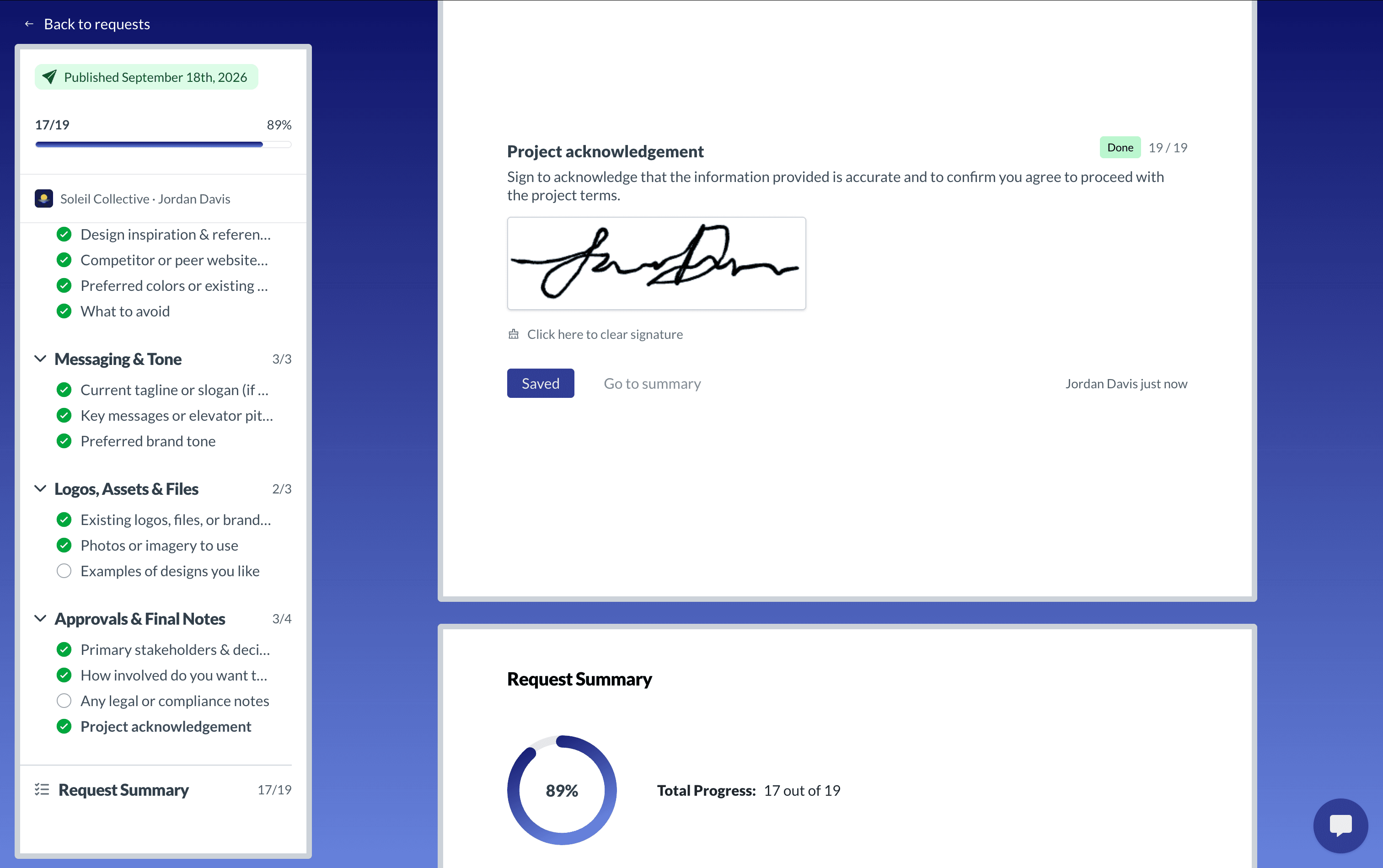
Add a signature field to any request and let clients sign directly in their browser. Use it for acknowledgments and simple sign-offs while keeping the response with the request.

  • Draw-to-sign pad works on desktop, tablet, and mobile
  • Useful for client acknowledgments and simple sign-offs
  • Signatures saved with the request response
Digital signature capture in a client request form
Request Dashboard

Know Where Every Request Stands

See client intake move from draft and scheduled work to published, overdue, and completed requests. The shared board makes it easier to spot what still needs attention.

DraftsScheduledPublishedOverdueCompleted
Kanban-style request dashboard showing request statuses

Follow Up Without Rebuilding the Email Trail

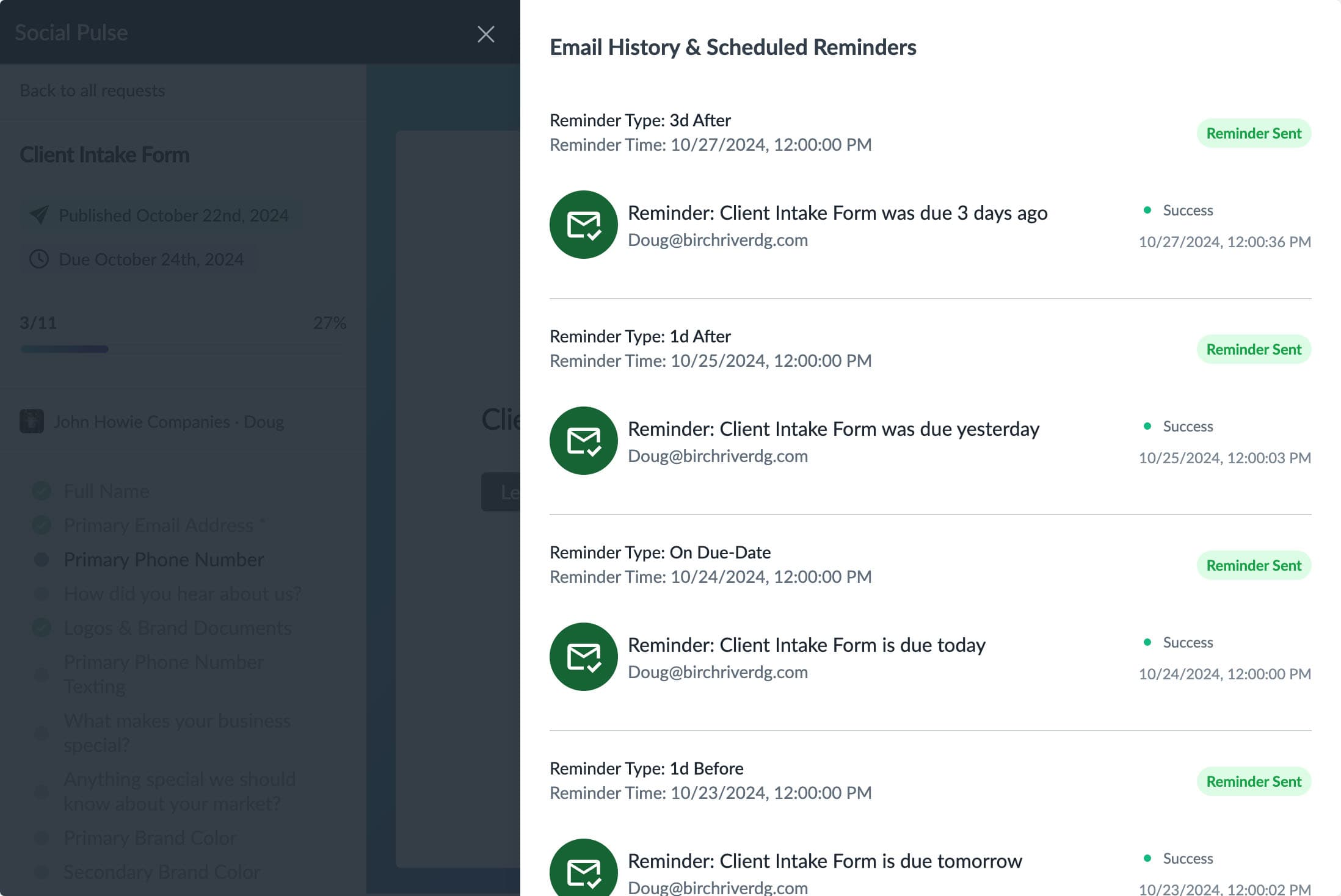
Add due-date-based email reminders before, on, or after a request is due. Sydnee keeps the schedule with the request so your team can see what is planned and what was sent.

Before or On Due Date

5 days before3 days before1 day beforeOn due date

After Due

1 day overdue3 days overdue
  • Schedule requests to publish at a future date
  • Private requests when exactly one portal member is selected
  • Review scheduled reminders and supported email history
Email history showing scheduled reminders for client requests

Gather and Organize Files Directly from Clients

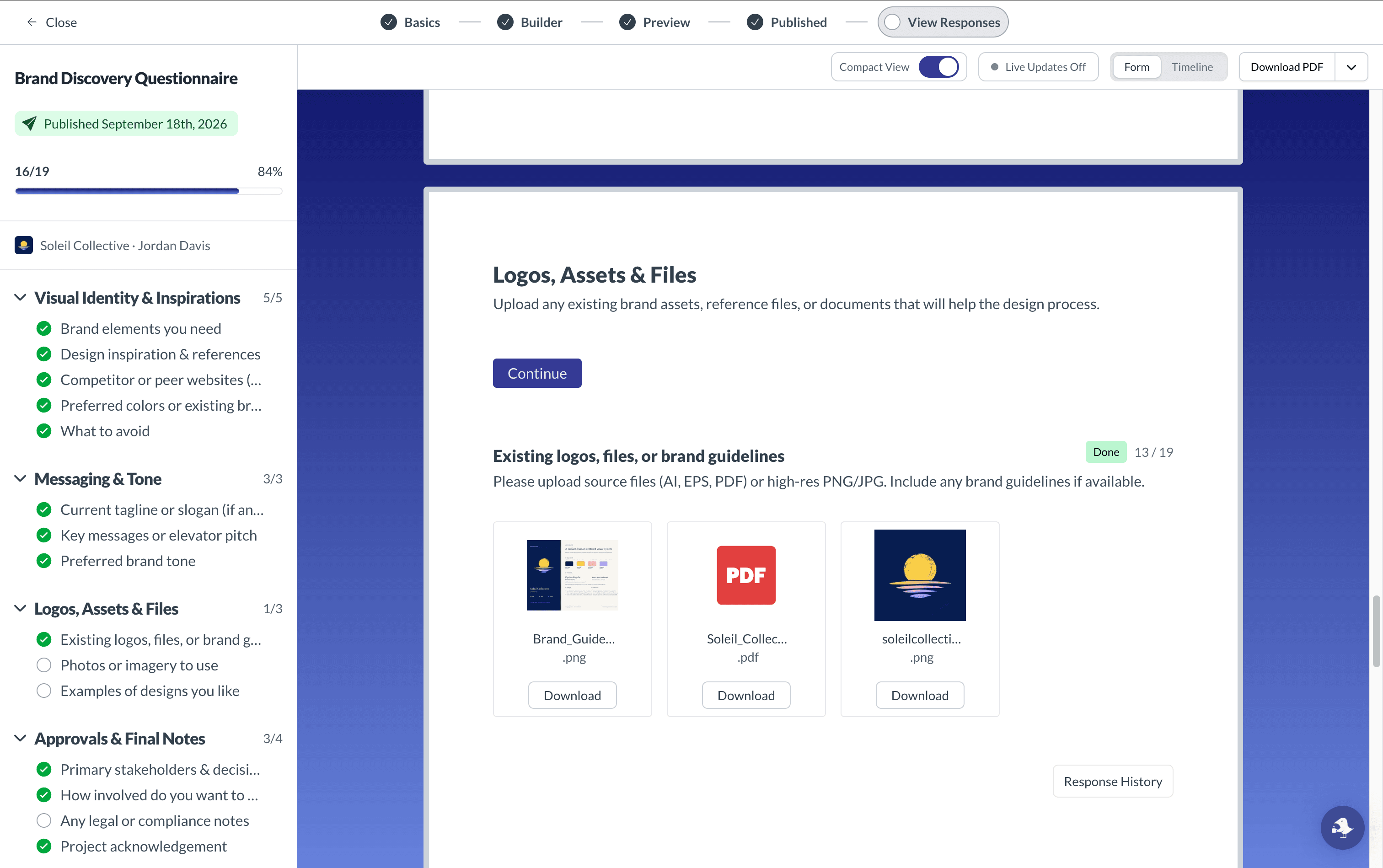
Requesting and collecting files is now as simple as a few clicks. Clients can drag-and-drop files directly into your request form.

  • Uploads added to a request-oriented folder in account Files
  • Allow one or multiple files on an upload field
  • Download submitted request files together as a ZIP
Client request form with file uploads and document management

Never Start from Scratch

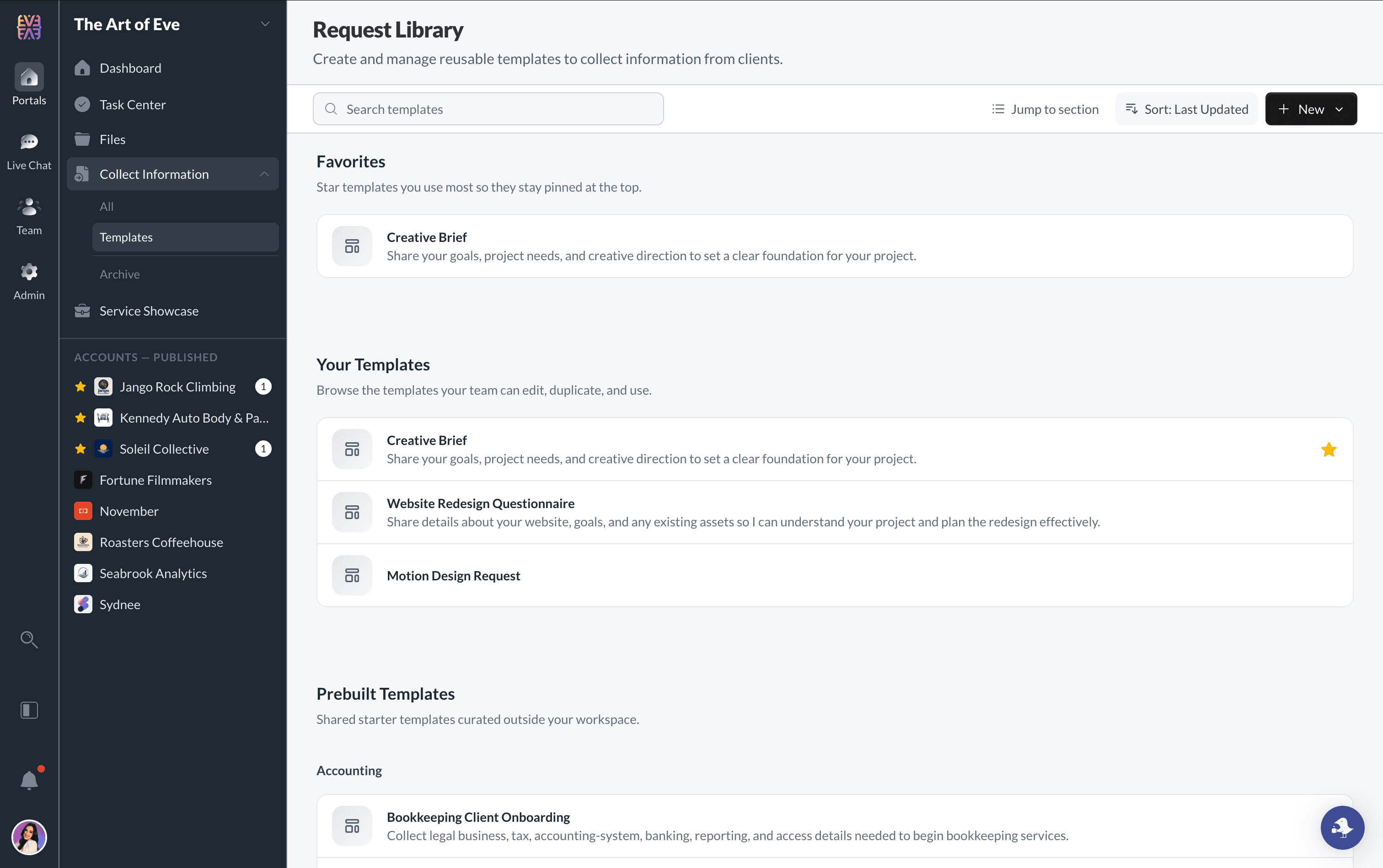
Start with pre-built global templates or create your own team templates. Standardize your intake process and ensure consistency across every client interaction.

  • Ready-to-use templates for common use cases
  • Create team templates with saved conditional logic
  • Create requests from templates through the supported public API
Request templates library with ready-to-use options

Skip the blank page.

Browse Sydnee-provided request templates, choose a useful starting point, and customize the fields and instructions for your client before publishing.

Collect Client Branding Docs
Google Access Setup
Marketing Agency Onboarding
Social Media Strategy Form

Built for Your Industry

One tool, countless use cases

Adapt Requests to the information, files, and acknowledgments your service workflow needs from each client.

Consultants & Advisors

Strategy, Operations, Business Consulting

  • Client onboarding questionnaires
  • Project intake forms
  • Discovery questionnaires
  • Periodic document requests

Creative Agencies

Design, Marketing, Branding

  • Creative briefs with color pickers
  • Brand asset collection
  • Client acknowledgment forms
  • Feedback and revision forms

Photographers

Photographers & Photography Studios

  • Branded client intake forms
  • Session booking forms
  • Shot list questionnaires
  • Session detail confirmations

Real Estate

Property Management, Brokerages

  • Rental applications
  • Vendor onboarding forms
  • Maintenance request intake
  • Property information collection

Coaches & Consultants

Business Coaches, Trainers, Advisors

  • Client onboarding questionnaires
  • Program enrollment forms
  • Session feedback collection
  • Program acknowledgment forms

Event Professionals

Planners, Coordinators, Vendors

  • Event planning questionnaires
  • Vendor information forms
  • Guest list collection
  • Event detail confirmations

Your Brand, Their Experience

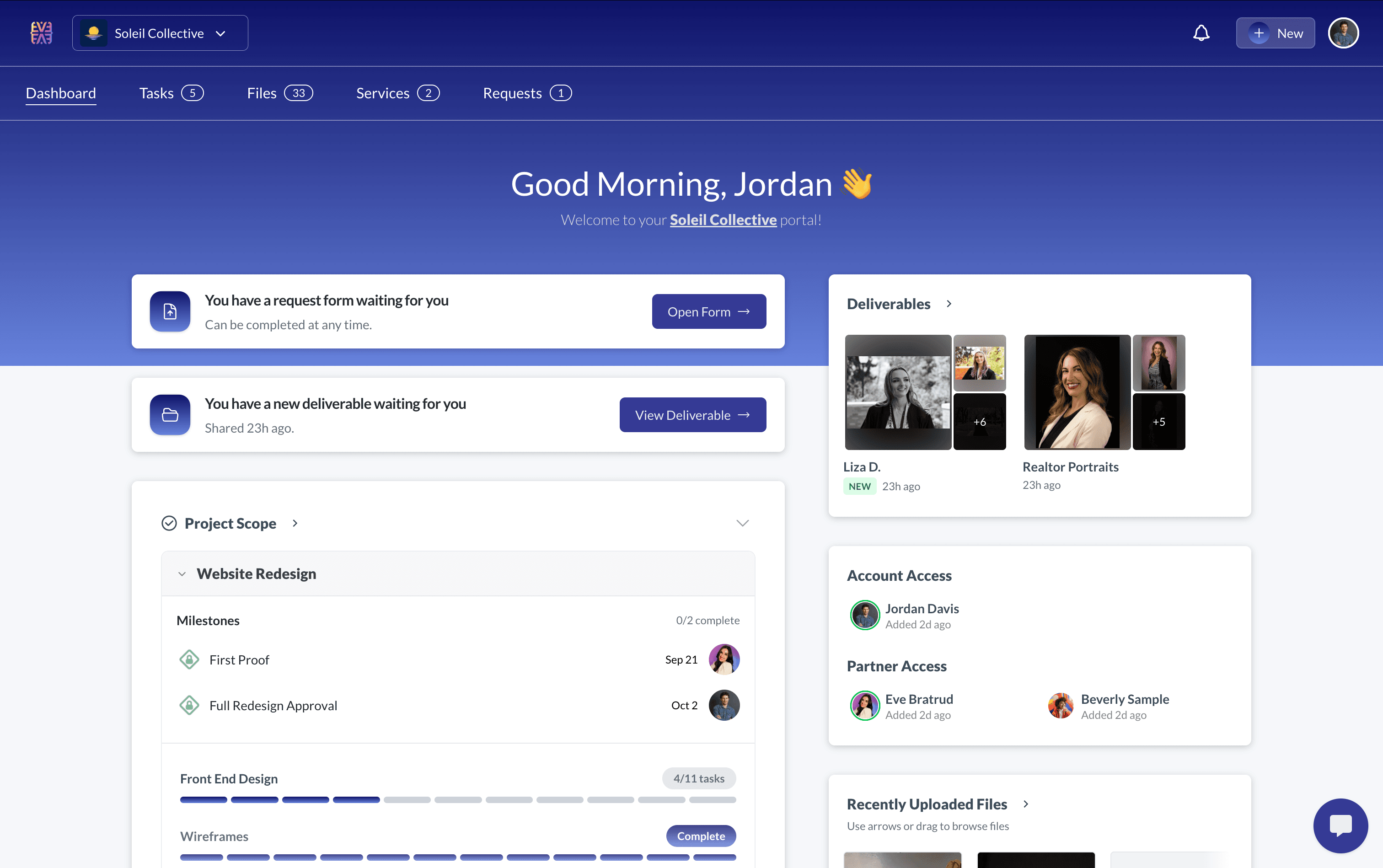
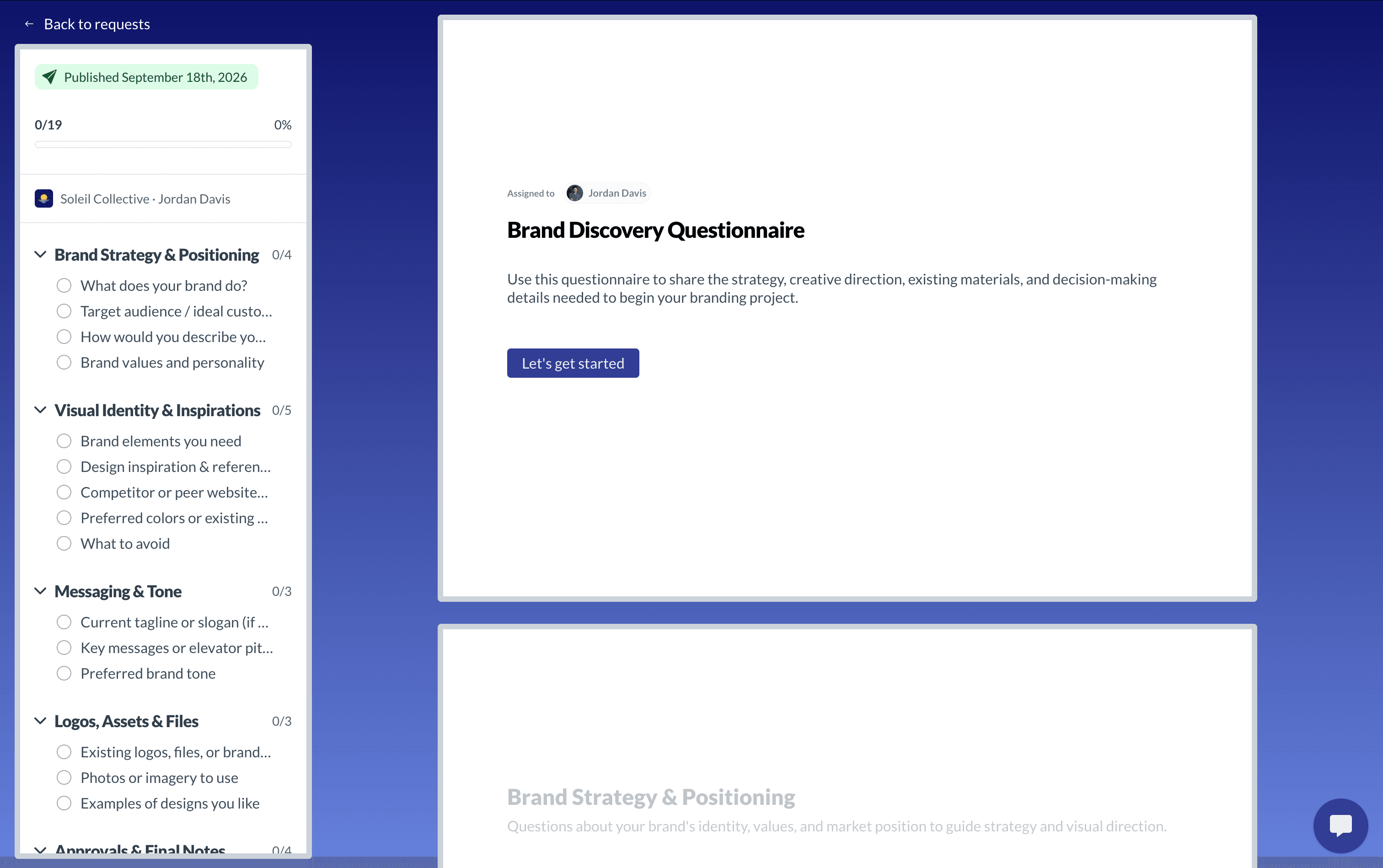
Requests appear in the same branded portal clients use for their other account work, with your business name, logo, colors, and configured portal address.

  • Choose an available business.sydnee.app subdomain
  • Or connect your own custom domain
  • Clients can return to saved responses and visible progress
Branded Client Portal Screenshot

Frequently Asked Questions

Everything you need to know about Sydnee Requests

How is Sydnee different from Google Forms or Typeform?
Sydnee Requests are built around ongoing client work. Each form belongs to a client account, appears in the branded portal for its intended audience, keeps responses together, and can collect files into the account's Files system.
Can clients add their signature to requests?
Yes. Add a signature field and clients can draw a signature directly in the browser. It captures a signature response; it is not a contract or identity-verification service.
How do automated reminders work?
Add one or more email reminders to a request with a due date. Choose the due date itself, 1, 3, or 5 days before, or 1 or 3 days after. You can also send a manual notification while the request is active.
Can I schedule requests to be sent later?
Absolutely. Create requests in advance and schedule them to publish at a specific date and time. Perfect for onboarding sequences, seasonal intake forms, or timed document collection.
What file types can clients upload?
Clients can upload one or multiple files when a request includes a file-upload field. Submitted files are added to a request-oriented folder in the account's Files system, and the request's uploads can be packaged as a ZIP download.
Are there pre-built templates I can use?
Yes. Start with a Sydnee-provided template, create a team template from scratch, or save an existing request as a reusable starting point. You can edit the result before publishing it to a client.
Can I show follow-up questions only when they matter?
Yes. Sydnee supports conditional show and hide rules, including multiple conditions with AND/OR logic, so later fields or sections can respond to earlier answers.
Can I add extra protection for sensitive short-text answers?
Yes. Short-text fields can be marked as sensitive, which encrypts saved responses and masks them by default in ordinary views. An authorized team member must explicitly reveal the answer.
Can I control who sees submitted requests?
Yes. Assign a request to selected portal members or make it available account-wide. When exactly one portal member is selected, you can make the request private to that person.
Can I review and export client responses?
Yes. Review the current form state or a chronological response timeline, download visible responses as a PDF, and package files submitted through upload fields as a ZIP.
Can I use Sydnee as a complete client intake system?
Yes. Sydnee combines account-based intake forms, conditional logic, file and signature collection, scheduling, reminders, and reusable templates inside the same branded portal clients use for ongoing work.
Sydnee

Try Sydnee Client Portals Today

Client & team live chat, Direct Messages, and Channels
Built in task manager
Showcase services in your portal
Easy client onboarding & info requests
Secure file storage & sharing
Embed Calendly, Figma, Loom, Google Looker & more
Custom domain & full white labeling
Unlimited client seats
No credit card required

Choose the right Sydnee plan for you

Compare Core, Growth, and Power Team pricing, then start free before you commit.

Core

/ month

For solo operators & small teams

Get Core
  • Up to 2 team members
  • 100 client portals
  • 1.00 TB file storage
  • API and Zapier access included
  • Custom domain, email, and white-labeling
Most Popular

Growth

/ month

Built for growing teams managing multiple clients

Get Growth
  • For growing teams (3 - 24 members)
  • 1,000 client portals
  • 3.00 TB file storage
  • API and Zapier access included
  • Custom domain, email, and white-labeling
  • Conditional & encrypted request options

Power Team

/ month

For larger teams that need speed + support

Get Power Team
  • 25+ team members
  • 10,000 client portals
  • 10.00 TB file storage
  • API and Zapier access included
  • Custom domain, email, and white-labeling
  • Conditional & encrypted request options
  • Priority support
  • Sydnee turned our onboarding into a simple, repeatable process that just works.

    Patrick Benske, Benske Agency, Founder
    Patrick Benske
    Benske Agency, Founder
  • Whether you're tech savvy or not, this is gonna work for you, and it's so simple, anyone can use it.

    Steven Diamond, Diamond Ai Media Group, Founder
    Steven Diamond
    Diamond Ai Media Group, Founder
  • Between the white-labeling, templates, and client collaboration, Sydnee covers everything we used to patch together across other tools.

    Carmelo Santos, Co-found Council of Marketers
    Carmelo Santos
    Co-found Council of Marketers
  • It's so nice to have everything in one place—clients can see our progress, and we can see every task at a glance

    Michael Rapino, HoneyQuill Agency, Founder
    Michael Rapino
    HoneyQuill Agency, Founder
  • Sydnee has been the best investment I've made for my agency thus far. There is not better platform with the features included for the price point they are at.

    Luis Leon, Promise Pixel, Founder
    Luis Leon
    Promise Pixel, Founder
  • Sydnee offers our Clients a clean simple platform that is easy to understand and navigate.

    Laura McDermott, Owner, Mcdermott Law Firm, PLLC
    Laura McDermott, Owner
    Mcdermott Law Firm, PLLC