Gradient background pattern

Secure File Sharing Built for Client Collaboration

Cloud storage with granular client access controls. Upload, organize, and share files securely. Preview PDFs, images, videos, and even RAW photos—all without per-seat pricing.

Sydnee customerSydnee customerSydnee customerSydnee customer

Used by 2,000+ agencies & freelancers

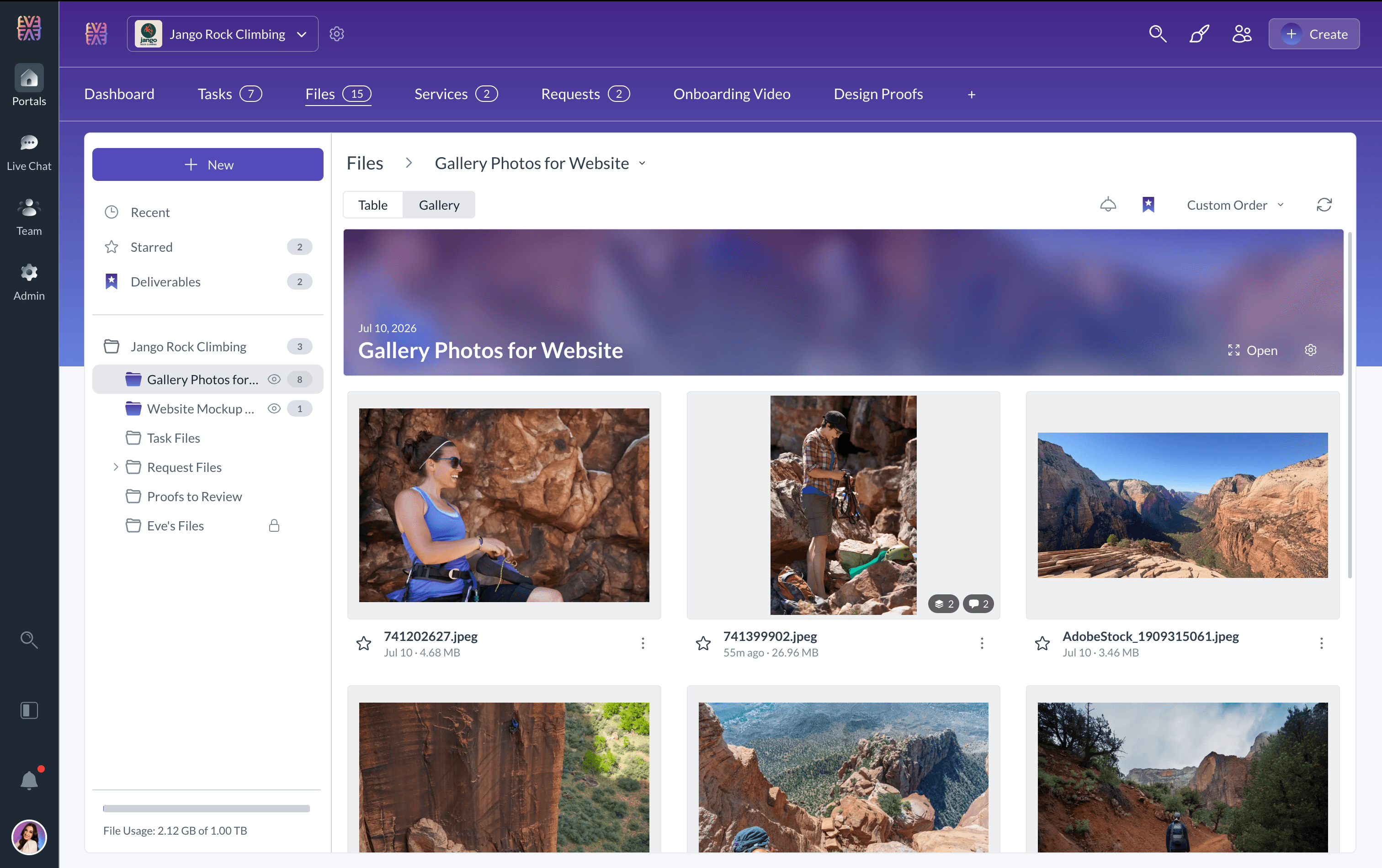
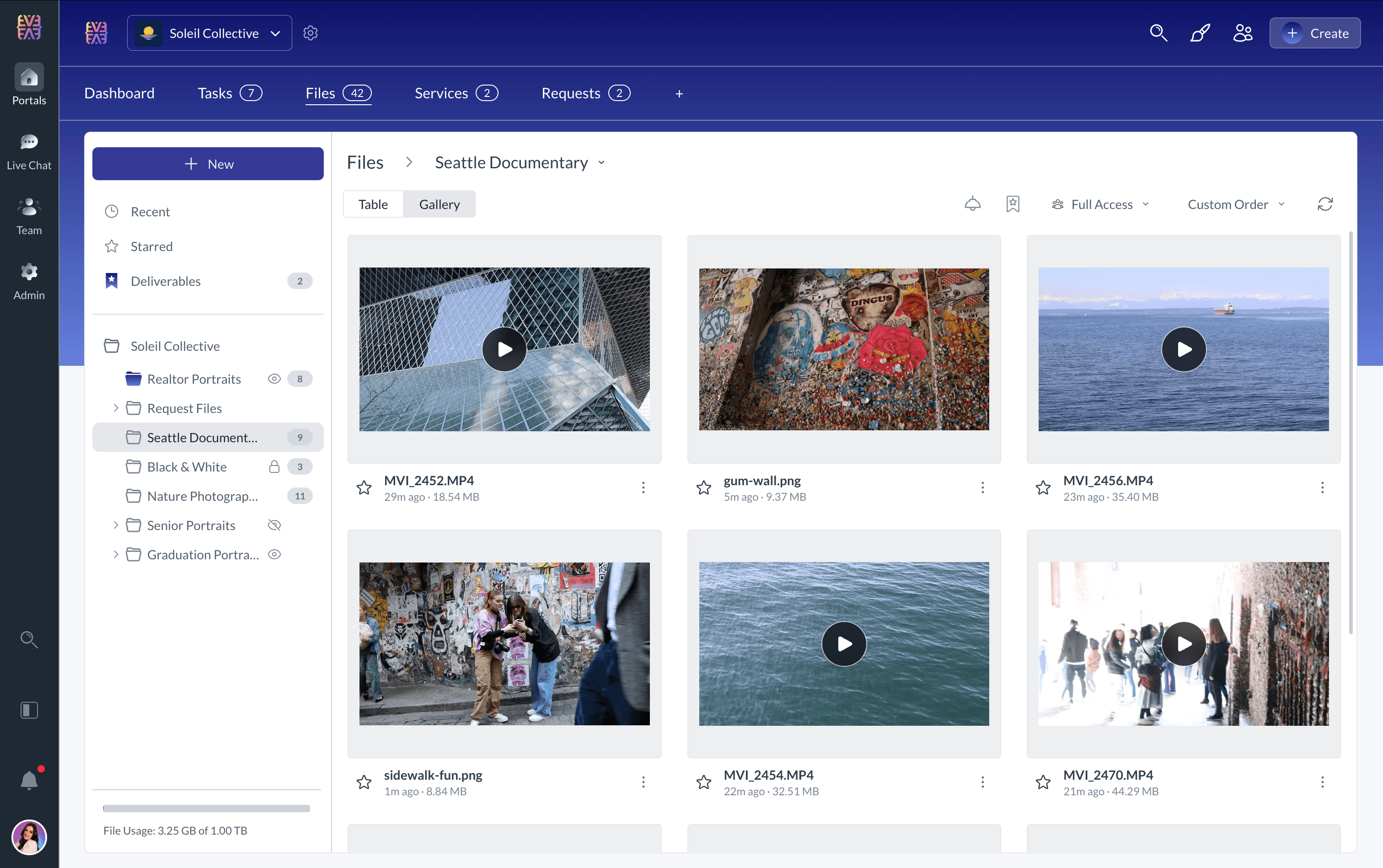
File management interface showing folder organization and file preview capabilities

17 Powerful Features

Everything you need to manage client files

From drag-and-drop uploads to professional RAW photo support—a complete file management system built for client-facing teams.

Drag & Drop Upload
Multi-File Upload
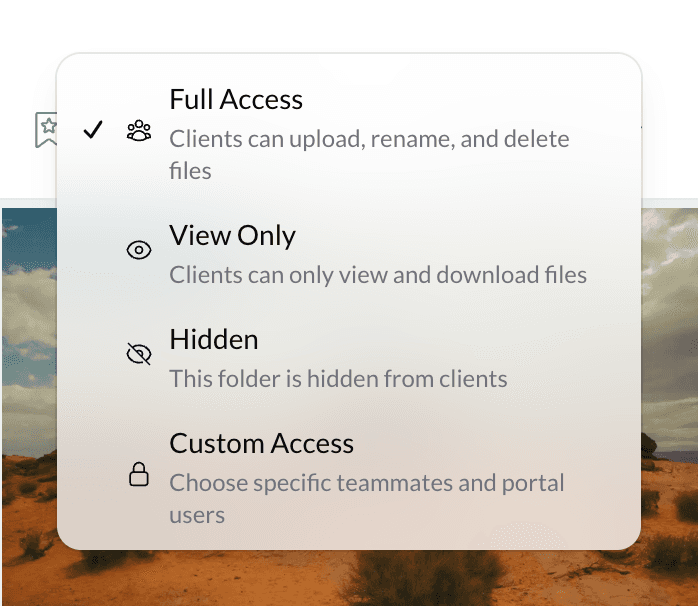
3-Level Access Control
Folder Organization
Table & Gallery Views
PDF Preview
Image Viewer
Video Player
Audio Player
RAW Image Support
Starred Files
Recent Files
Folder ZIP Download
WYSIWYG Sort Order
Shareable Links
Default Templates

Granular Access Control

Three Levels of Client Access

Control exactly what clients can see and do. Set permissions per folder with inheritance that can be overridden at any level.

Full Access

Complete control for trusted collaborators

  • View all files and folders
  • Upload new files
  • Download files and folders
  • Create and organize folders
  • Rename and delete files

View Only

Read-only access for stakeholders

  • View all files and folders
  • Download individual files
  • Download folders as ZIP
  • Preview documents in-browser
  • Cannot modify or upload

Hidden

Private folders invisible to clients

  • Folder not visible to clients
  • Internal team access only
  • Keep sensitive files private
  • Works within shared accounts
  • Override inherited access

Effortless Uploads, Powerful Organization

Upload files the way that works for you. Drag and drop files, or select up to 100 files at once. Large files up to 2GB are fully supported.

  • Drag and drop files directly into any folder
  • Upload up to 100 files simultaneously
  • Sort by custom drag-and-drop order, upload date, or name—clients see exactly what you set
  • Unlimited folder nesting for professional organization
Flexible Views

Table or Gallery—Your Choice

Switch instantly between Table View for detailed file lists and Gallery View for visual browsing. Sort by custom order, upload date, or name—and your clients see the exact same order you do.

Table View

Detailed list with sortable columns

  • Sort by name, date, size
  • See file details at a glance
  • Efficient for documents

Gallery View

Visual thumbnail grid layout

  • Large image previews
  • Perfect for visual assets
  • Quick visual scanning
Starred FilesRecent FilesBreadcrumb Navigation

Preview Any File Without Downloading

Click any file to open it in a full-screen viewer. Navigate between files with keyboard arrows, zoom and pan images, flip through PDF pages, or play videos and audio—all without leaving your browser.

Images

JPG, PNG, GIF, WebP, SVG, HEIC

Documents

PDF

Video

MP4, WebM, MOV

Audio

MP3, WAV, M4A, OGG

RAW Photos

CR3, DNG, NEF, ARW

Fullscreen viewer with zoom and pan
Keyboard navigation between files
Professional RAW photo format support
Easy Sharing

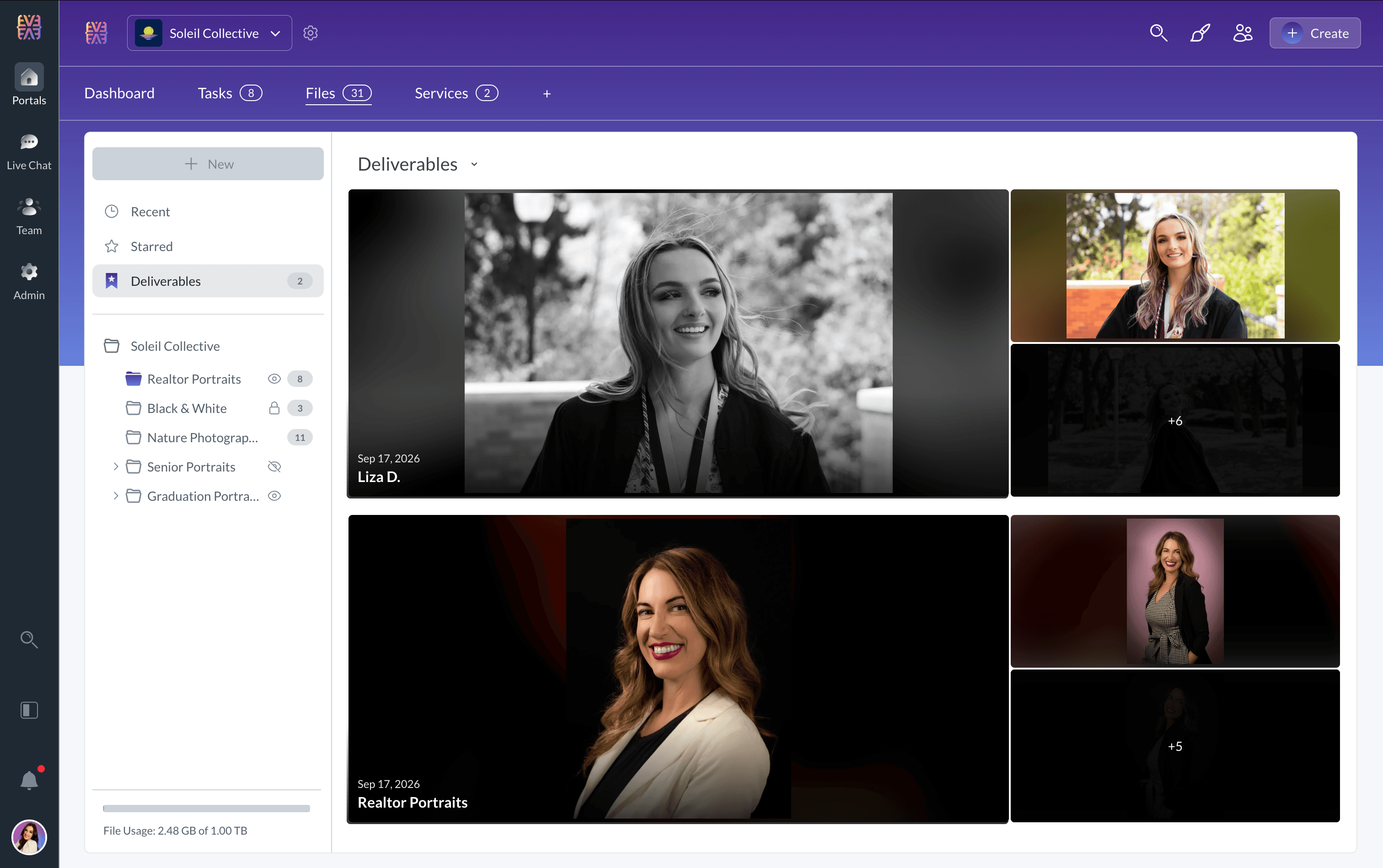
One-Click Folder Downloads

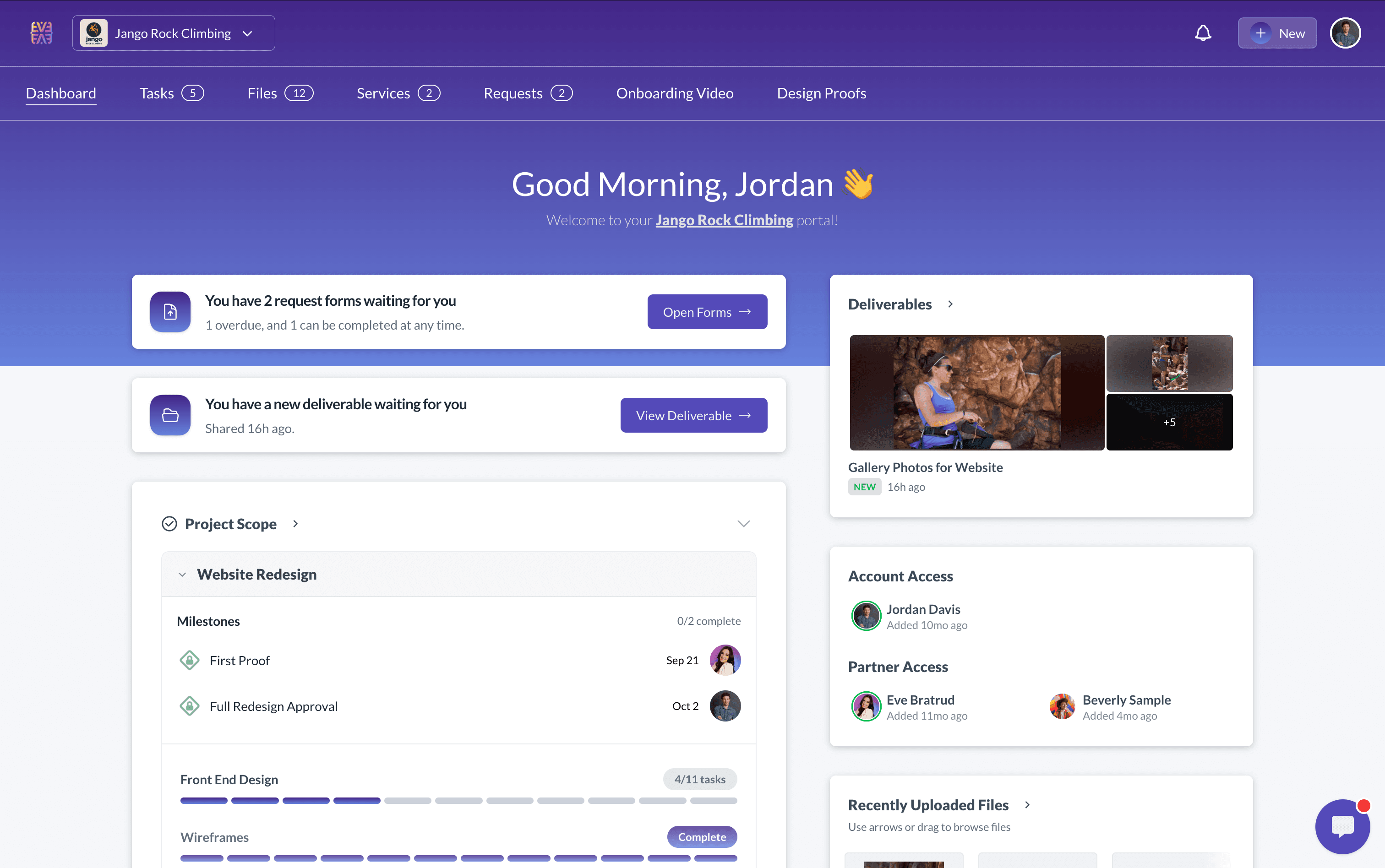
Download any folder as a ZIP file with a single click. Perfect for delivering project assets, sharing document bundles, or backing up entire client folders.

  • Entire folders downloaded as organized ZIP files
  • Subfolder structure preserved in downloads
  • Available to clients with View Only or Full Access
  • Generate shareable links for external stakeholders

Download as ZIP

Preserves folder structure

Share Link
Enterprise Security

Secure Cloud Storage You Can Trust

Built on AWS S3 with per-tenant allocation and usage tracking. Your files are encrypted, organized, and always accessible when you need them.

Encrypted Storage

Files encrypted at rest and in transit

Accelerated Downloads

Fast file delivery for clients worldwide

Secure Sharing

Controlled access links

Built for Your Industry

Secure file sharing that fits how you work

See how teams across industries use Sydnee Files to store, organize, and share documents with clients securely.

Consultants & Advisors

Strategy, Operations, Business Consulting

  • Client document exchange
  • Contract & proposal storage
  • Organized file libraries
  • Project deliverables

Creative Agencies

Design, Marketing, Branding

  • Asset delivery & approvals
  • Brand asset libraries
  • Project deliverables

Photographers

Studios, Freelancers, Events

  • RAW file delivery
  • Client gallery sharing
  • Proof selection workflow
  • High-res downloads

Real Estate

Agents, Property Managers

  • Transaction documents
  • Property photos & videos
  • Listing asset storage
  • Client document collection

Event Professionals

Planners, Coordinators, Vendors

  • Vendor contract storage
  • Event photo delivery
  • Client mood boards

Coaches & Consultants

Business Coaches, Trainers

  • Resource libraries
  • Course material delivery
  • Client workbook sharing
  • Session recordings

Frequently Asked Questions

Everything you need to know about Sydnee File Sharing

What file types does Sydnee support?
Sydnee supports virtually all file types. You can preview images (including RAW formats like CR3, DNG, NEF, ARW), PDFs with page navigation, videos with playback controls, and audio files with waveform visualization—all directly in the browser without downloading.
How does client access control work?
Each folder can be set to one of three access levels: Full Access (clients can view, upload, download, and organize files), View Only (clients can view and download but cannot modify), or Hidden (folder is invisible to clients). Access levels are inherited by subfolders but can be overridden.
Can clients upload files to my portal?
Yes! When a folder is set to Full Access, clients can upload files using drag-and-drop or multi-file selection. They can upload up to 100 files at once, with individual files up to 2GB each.
Can I download entire folders at once?
Absolutely. Any folder can be downloaded as a ZIP file with a single click. This works for both you and your clients (if they have View Only or Full Access), making it easy to share entire project deliverables.
How do file previews work?
Click any file to open it in a full-screen viewer. Images support zoom, pan, and rotation. PDFs show page thumbnails with navigation. Videos and audio have full playback controls. You can navigate between files using arrow keys without closing the viewer.
What's the difference between Table and Gallery view?
Table View shows files in a detailed list with columns for name, size, date, and type—great for document-heavy workflows. Gallery View displays large thumbnails in a visual grid, perfect for images and creative assets. Switch between views instantly.
Can I share files with external links?
Yes. Generate shareable links for individual folders that can be accessed by anyone with the link. Perfect for sharing deliverables with stakeholders who don't have a portal account.
How does file sorting work?
You can sort files by custom drag-and-drop order, upload date, or name. The order you set is exactly what your clients see—no surprises. Drag files to reorder them manually, or let the system sort automatically.
Can I set up a default folder structure for new accounts?
Yes! Create a default file module template with your standard folder structure, and every new account you create will automatically include those files and folders. Perfect for onboarding workflows where every client needs the same starting documents or folder organization.

Why agencies choose Sydnee over Dropbox

Dropbox

File storage

$12/user/mo
  • Per-user pricing for team and client access
  • Shared links show Dropbox branding
  • No granular folder permissions (Full/View/Hidden)
  • Disconnected from tasks, requests, and chat
  • Clients see a generic file interface

Sydnee

All-in-one portal

$30/mo
  • Flat pricing—unlimited users included
  • Branded share links with your domain
  • 3-level folder access: Full, View Only, Hidden
  • Files integrated with tasks & requests
  • Clients see your branded portal experience
Try Sydnee Free for 5 Days

No credit card required

Sydnee

Try Sydnee Client Portals Today

Client & team live chat
Built in task manager
Showcase services in your portal
Easy client onboarding & info requests
Secure file storage & sharing
Embed Calendly, Figma, Loom, Google Looker & more
Custom domain & full white labeling
Unlimited client & teammate seats
No credit card required

Simple Pricing.

Get 100% setup and implemented before ever pulling out the credit card.

Standard

per month

Start free trial
  • All features included
  • 1,000 Accounts
  • 1TB Storage
  • Unlimited teammates & client seats
  • Custom domain + email white-label
  • API + Zapier Access

Premium

per month

Start free trial
  • Everything in Standard
  • Priority Support
  • 10,000 Accounts
  • 3TB Storage
  • Sydnee turned our onboarding into a simple, repeatable process that just works.

    Patrick Benske, Benske Agency, Founder
    Patrick Benske
    Benske Agency, Founder
  • Whether you're tech savvy or not, this is gonna work for you, and it's so simple, anyone can use it.

    Steven Diamond, Diamond Ai Media Group, Founder
    Steven Diamond
    Diamond Ai Media Group, Founder
  • Between the white-labeling, templates, and client collaboration, Sydnee covers everything we used to patch together across other tools.

    Carmelo Santos, Co-found Council of Marketers
    Carmelo Santos
    Co-found Council of Marketers
  • It's so nice to have everything in one place—clients can see our progress, and we can see every task at a glance

    Michael Rapino, HoneyQuill Agency, Founder
    Michael Rapino
    HoneyQuill Agency, Founder
  • Sydnee has been the best investment I've made for my agency thus far. There is not better platform with the features included for the price point they are at.

    Luis Leon, Promise Pixel, Founder
    Luis Leon
    Promise Pixel, Founder
  • Sydnee offers our Clients a clean simple platform that is easy to understand and navigate.

    Laura McDermott, Owner, Mcdermott Law Firm, PLLC
    Laura McDermott, Owner
    Mcdermott Law Firm, PLLC