

A client portal earns a place in the relationship when clients know where to go, what to do next, and which work is current. A long menu of features cannot compensate for a confusing entry point or an empty dashboard.
Client portal best practices should focus on adoption, not feature count. Give clients one destination, reduce sign-in friction, show relevant next actions, and keep internal work out of their view.
If you are still defining the category, start with what a client portal is and how it works. If you are comparing platforms, use the client portal feature evaluation guide. This guide assumes the portal exists and focuses on whether clients can use it confidently.
Start with the jobs clients need to complete
Your internal workflow may involve Requests, Tasks, Files, conversations, and delivery. Clients should not have to understand that architecture before they can act.
Start with a short list of client jobs:
- Submit the information or files your team needs
- Complete an assigned action
- Find the current version of shared work
- Ask a question in the right conversation
- Return to finished work after delivery
Each job needs an obvious destination. If clients must search email for one link, a shared drive for another, and chat for the latest decision, the portal has not created one destination.
In Sydnee's client portal platform, each client relationship has an account, which is the workspace connecting its people and available modules. A client contact enters that account through the branded portal and sees only the work available to their portal identity.
Make the next action visible
Clients enter a portal because something prompted them. They need to complete a request, review a task, find a file, or open finished work. Put those actions ahead of decorative or rarely used content.
Sydnee's client dashboard can highlight outstanding Requests and newly published Deliverables. It can also show available Tasks, Files, Services, people, notifications, and account information. These dashboard widgets appear only when the related module, data, and visibility rules allow them.
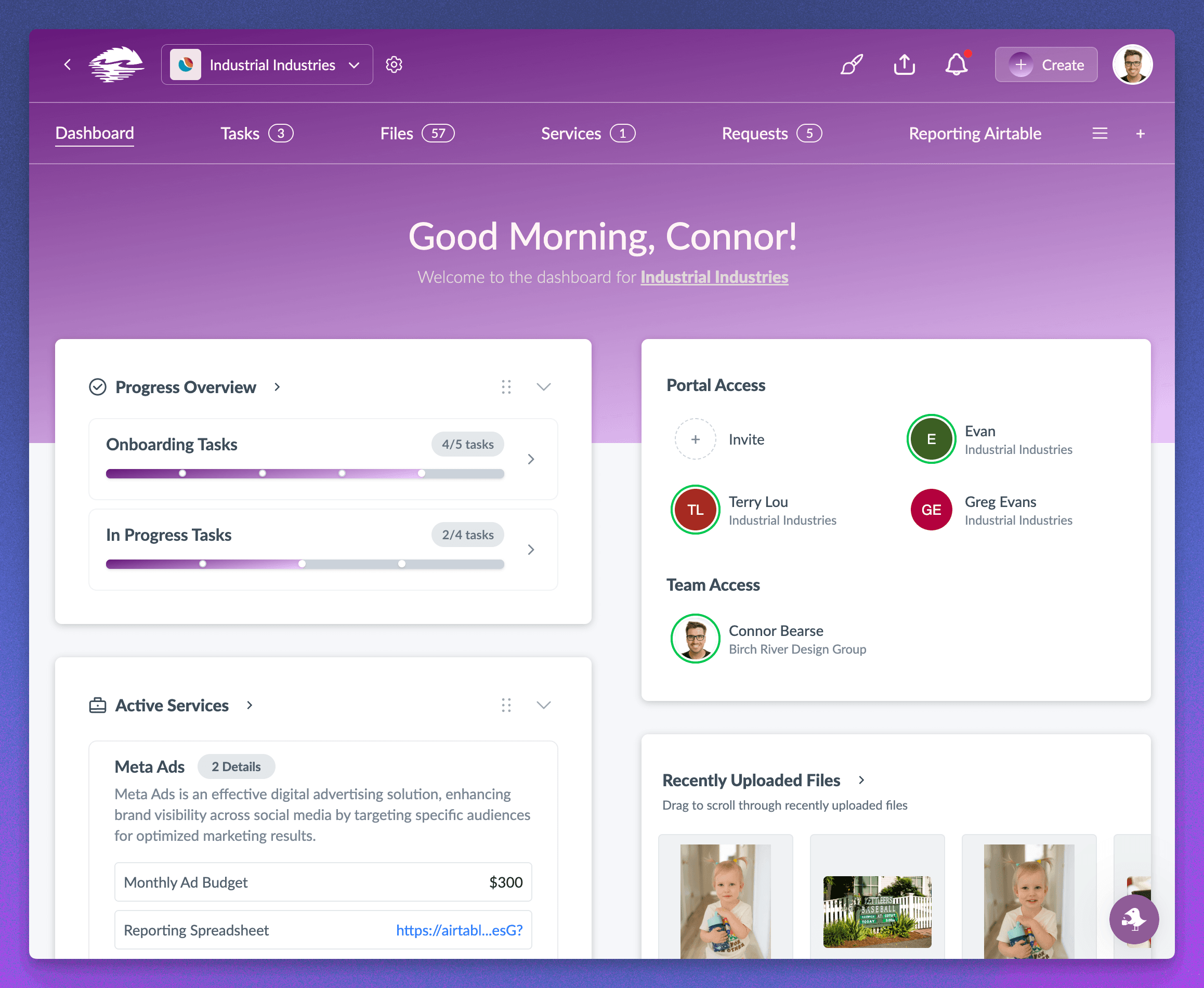
That conditional behavior matters. An empty module should not compete with work that needs attention. The dashboard should answer two questions:
- What needs me now?
- Where can I find work I may need again?
Set the dashboard expectation around useful signals rather than one universal feed. Task activity, file history, Requests, Live Chat, and notifications have distinct rules. Link each signal back to the work that owns it.
Remove avoidable sign-in friction
A portal cannot help a client who cannot enter it. Explain the sign-in process before the first important deadline, and make the portal address part of your normal client communication.
Sydnee portal users enter their email address and receive a five-digit access code by email. They do not create another portal password. If the same person belongs to multiple client accounts, they choose the account they want to open after authentication. See client sign-in and account switching for the current flow.
Passwordless access does not mean unrestricted access. The emailed code confirms the portal identity, and direct links can return that person to a permitted page after sign-in. Your invitation should tell clients which email address to use and where the code will arrive.
Before launch, test the flow with someone who did not configure the portal. Ask them to sign in, locate an assigned action, find a finished file, and return to the dashboard. Their hesitation will tell you more than another settings review.
Control visibility where the work lives
Clients need enough visibility to participate without seeing private notes, unfinished drafts, or work assigned only to your team. This boundary requires more than one workspace-level toggle.
In Sydnee, access varies by module and content type. Task boards, sections, Tasks, folders, files, conversations, and account settings can each affect what a portal contact sees. A useful launch check covers the actual client path:
- Open the portal as the intended client identity
- Confirm the navigation contains only relevant modules and custom pages
- Check visible Tasks and their client permissions
- Review folder and file access, including nested content
- Confirm conversation membership before sharing an update
- Verify that final Deliverables contain only client-ready files
Avoid the opposite mistake too. Hiding every sign of progress sends clients back to status emails. Show the milestones, requests, and files that help them act while keeping team-only context private.
The connected client portal workflow explains how each module supports a different stage of the work.
Keep the destination recognizable
Branding helps clients recognize that the portal belongs to the business they hired. Use the same business name, logo, and visual identity they see in your other client communication.
Sydnee supports a branded portal shell with workspace logos, colors, a Sydnee subdomain or connected custom domain, and a verified custom sender for supported emails. The company branding and domain guide covers the current controls. Branding changes the presentation around the work. It does not replace the need for clear navigation, access controls, or current content.
The guide to white-label client portal branding explains which parts of the client experience branding changes and which workflow decisions still belong to your team.
Account logos and workspace branding also serve different purposes. The workspace identity frames the portal, while an account can carry its own client-specific logo. Test both together instead of assuming every asset appears in every location.
Give clients one operating rule
Adoption suffers when your process says, "Use the portal, unless someone sends the file by email or the decision happens in chat." Pick one durable rule and repeat it during onboarding.
A practical rule is: the portal contains the current work and the final handoff. Email can notify the client, but the message should lead back to the permitted Request, Task, file, conversation, or Deliverable.
Your team must follow the same rule. If someone keeps attaching final files to email, clients learn that the portal is optional. If a decision affects a Task or file, record it with that work instead of leaving the only copy in a private message.
Review the portal as a client
Run a client-side review before each new engagement and after meaningful workflow changes:
- Enter: Can the client identify the portal address and complete sign-in?
- Orient: Does the first screen explain the account and current priorities?
- Act: Can the client reach the next Request, Task, file, or conversation?
- Trust: Does the visible content belong to this person and this account?
- Return: Can the client find current files and finished Deliverables later?
- Recognize: Do the domain, sender, logo, and colors match the business?
This review should include a real portal identity with the intended permissions. A team-side preview cannot prove that every client boundary behaves as expected.
Build for return visits, not the launch tour
The strongest client portal is not the one with the most impressive kickoff. It is the one a client can revisit weeks later and understand without another walkthrough.
Keep the destination consistent, make current actions visible, test access as the client, and remove modules that do not support the relationship. Next, use the connected client portal workflow to assign a clear job to each visible module.







