

This week, we're adding a way to see your client portal from a specific client's point of view. We've also made a round of fixes to Requests, Tasks, and Live Chat.
Here's what's changed since last Friday's roundup.
See the portal the way your client does
Once you've added a client to an account, you can check the portal from their side. Make sure the proposal is there, the right files are visible, and their onboarding Request is ready. Portal Preview lets you choose a client and see what they'll see when they sign in.
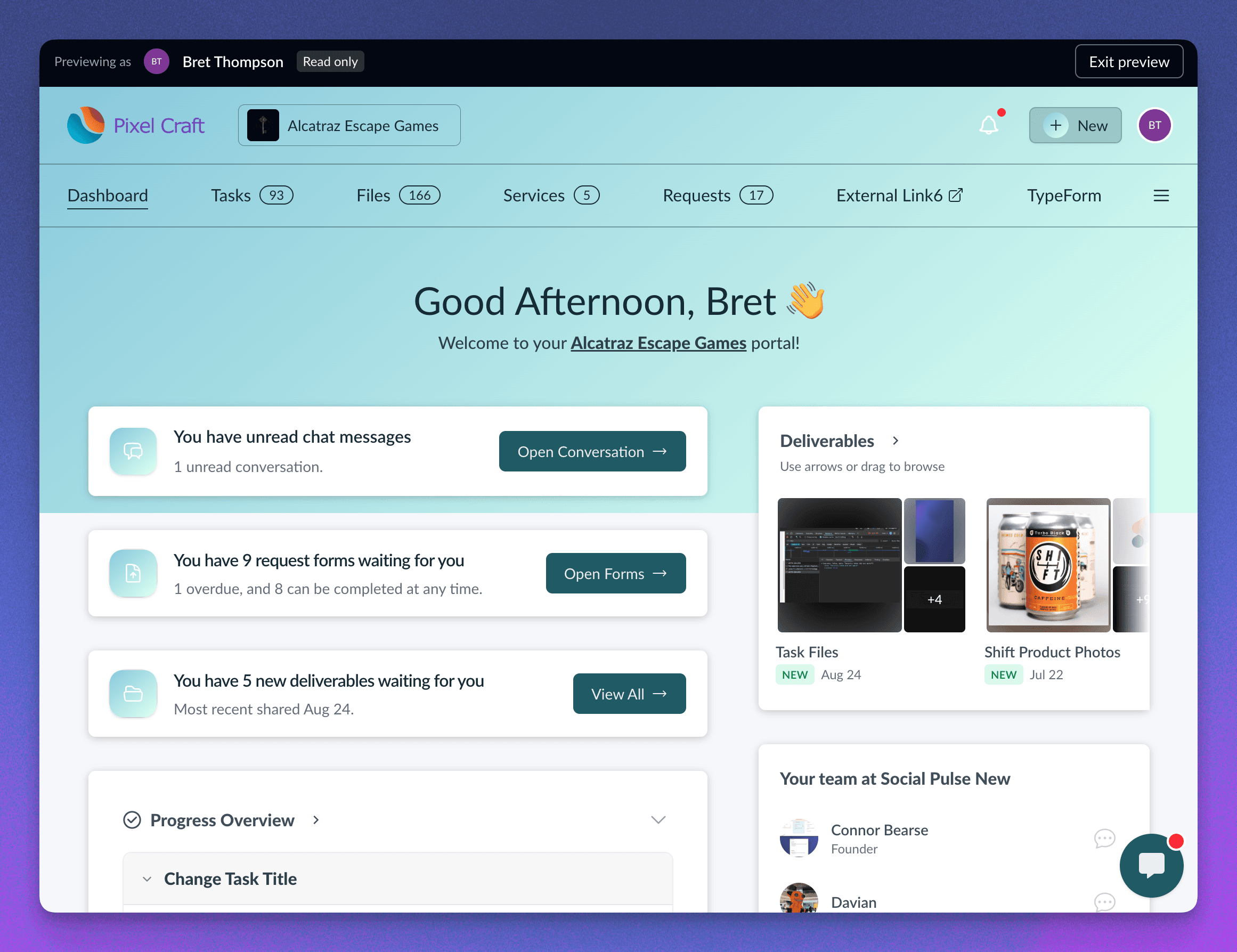
It's useful once work is underway, too. If a client asks where to find a file, you can look at their view and point them to the right place. Your visit leaves their work and unread activity untouched.
Portal Preview is available outside Healthcare workspaces.
Coming soon: our first MCP release
We're getting ready to connect Sydnee with AI assistants through MCP (Model Context Protocol). Our first release will focus on finding and updating Account Tasks and your own Personal Tasks. I'll share more when it's ready to try.
This week's video walkthroughs
Give your files the right background
I also shared a walkthrough of file preview backgrounds this week. I use our logo files to show how a dark background can work for most of a collection, with a light background saved for the versions that need it.
The video covers workspace defaults and individual file settings, so you can choose how your work looks when a client opens it.
Watch my walkthrough on YouTube · Read about file preview backgrounds
Check activity before your next client follow-up
Ethan also recorded a short walkthrough of client logins, Request responses, and task activity. He uses a coffee shop demo account to show how you can check what's already happened before asking a client for an update.
Watch Ethan's walkthrough on YouTube · Read the walkthrough
Fixes and improvements
We shipped a crazy amount of fixes and improvements this week, and I've rounded them up below.
- Request file answers stay up to date across browser tabs, keeping your team and clients working from the latest saved uploads.
- More resilient Request uploads keep saved files in place when you retry.
- Checkbox answers stay in sync as clients update their selections.
- Conditional questions follow their section's visibility rules for a more consistent form experience.
- Request progress updates in the background while you continue reviewing answers.
- Conditional rules stay visible as your edits save, making Request building feel smoother.
- Date answers retain the time you select for more precise scheduling.
- Improved handling of multiple encrypted Short Text answers keeps entries separate, including text containing commas.
- Private Request copies retain their original access setting for consistent client sharing.
- Requests created from templates bring the form and recipients together in one coordinated setup.
- Templates give each new Request a fresh set of answers while reusing your saved questions and conditions.
- Archived Requests leave the client portal while saved responses remain available to your team.
- Request lists and counts refresh together when you archive or restore a form.
- Request reminder and scheduled emails display deadlines in your workspace's timezone.
- Files and task calendars refresh when clients return to an open portal, keeping shared work current.
- Service Showcase picks up catalog updates after a quick return, with existing services visible while it refreshes.
- Folder visibility stays consistent between the portal sidebar and the main file list.
- Green activity rings in the People widget make recent account activity easier to spot.
- Healthcare Live Chat keeps conversations and drafts open when you dismiss an image, PDF, or reaction picker with Escape.
- Healthcare portal messaging offers your available account conversations, shared channels, and teammates directly from the header.
- Smoother team chat recovery keeps prepared attachments ready when you reconnect and provides a clear sign-in prompt when needed.
- Task and subtask activity stays focused on actual title changes for a cleaner work history.
- Task comment totals reflect the current discussion as comments are removed.
- More reliable task board permission saves support teams working on slower connections.
- Teammate invitations support email aliases with a plus sign, with clearer registration feedback when an address needs attention.
If there's a repeated step in your client work that you'd like us to make easier, send it through Support. Those details help us decide what to work on next.
- Connor