

Your team sends a campaign concept to a client on Tuesday.
By Wednesday, one reviewer has replied by email. Another has marked up a screenshot. A third sends, “The headline still feels off,” in a chat thread with no link to the file.
Then someone opens Tuesday’s attachment after your designer has already made a new version.
The feedback is not bad. The review process is.
When comments live away from the file, your team has to determine which version was reviewed, which element a note describes, and whether “looks good” records approval or only a reaction.
You do not need another meeting to fix this. You need one rule: feedback should stay attached to the exact work it describes.
That review is the middle of the client workflow, not the end. The broader path is Onboard → Work → Deliver. Collect inputs, collaborate on the file, then hand off the approved result so the client can recognize and return to it.
Keep review context with the file
Most feedback gets vague after it leaves the work.
“Move this up” makes sense beside a pin on page four. In an email sent six hours later, it becomes a guessing game. “Use the earlier image” is clear when everyone can see the version history. In a group chat, your designer has to ask which earlier image the client means.
Good review systems make the current state obvious. That follows a basic usability principle: people make better next-step decisions when they can see what is happening now and what their previous actions changed. The Nielsen Norman Group calls this visibility of system status.
For client work, the review state needs four clear facts:
- This is the version under review
- These comments apply to this version
- These changes still need action
- This is the decision that closes the round
If your process cannot answer those four questions, feedback will keep leaking into side conversations.
Follow three rules for file review
1. Give the review one current file
Keep revisions under the same file record instead of sending a new attachment for every change.
That creates several files that all look current depending on which inbox someone opens. Naming them homepage-final-v2-USE-THIS.pdf does not solve the problem. It only documents the confusion.
Keep each revision in one version history instead. Add a short change note that says what changed, such as “Replaced the hero image and shortened the headline.” The newest version becomes the current review copy while the earlier work stays available for reference.
If your team needs space for rough work, keep those drafts in a hidden folder. Move the client-ready file into a shared review folder when it is stable enough for useful feedback.
This gives your client one place to return and your team one history to trust.
2. Put each comment where the change belongs
Ask reviewers to comment on the file, not around it.
A threaded comment can cover the document's overall message. For a specific place in an image or PDF, use a numbered pin on the exact headline, chart, or page element.
Specific feedback reduces translation work:
- “Make the logo larger” becomes a pin on the logo with the requested size change
- “This chart is confusing” becomes a pin on the chart with the missing comparison named
- “Use the first option” becomes a comment on the correct version instead of a reply to an old email
In Sydnee File Sharing, team members and clients can use threaded comments on the same file when comments are enabled. Images and PDF pages support visual pins, so the location and conversation stay connected for visual feedback. When a specific person needs to respond, an @mention can direct their attention to the comment.
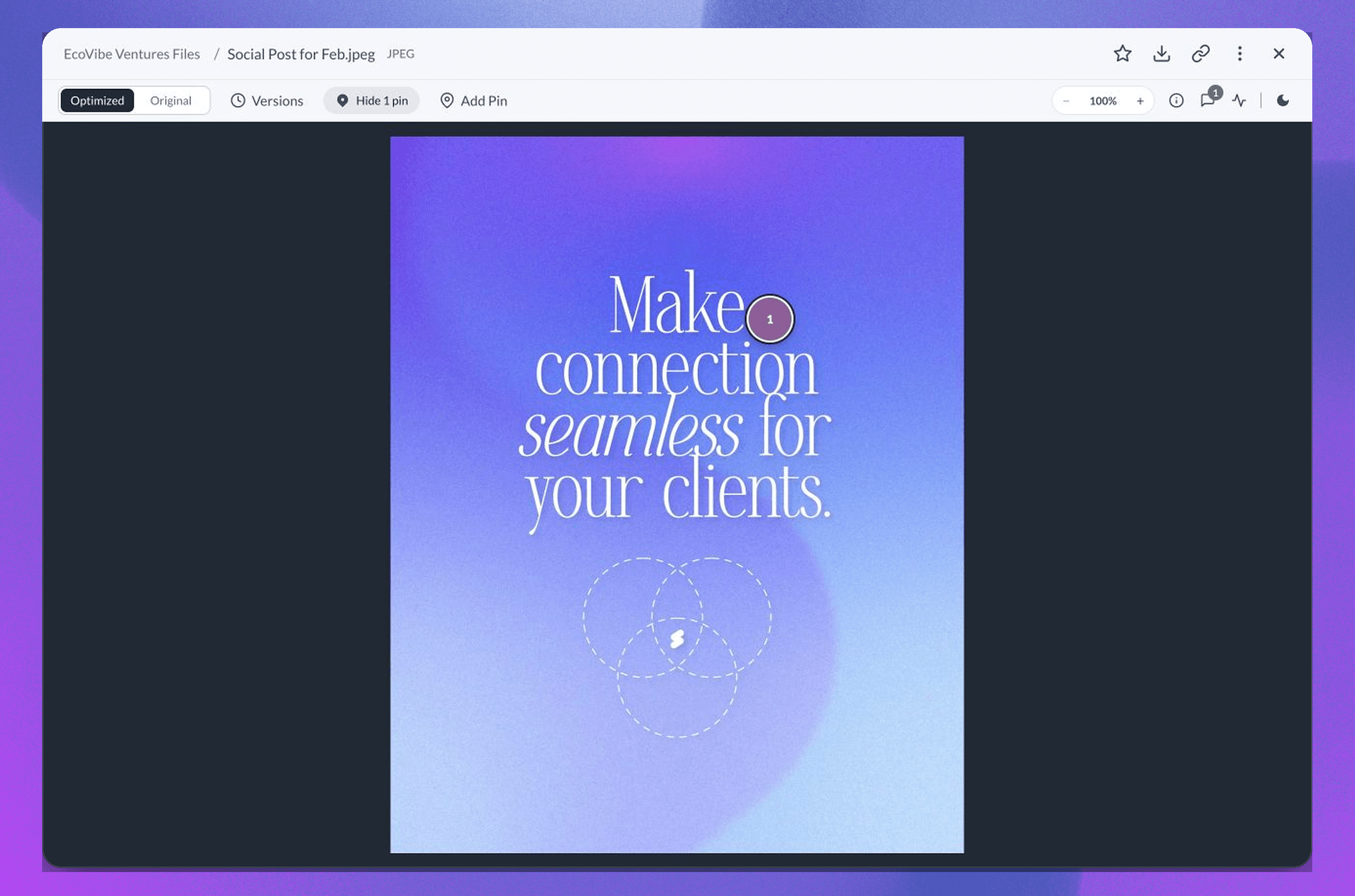
The client does not have to describe your own layout back to you. Your team does not have to decode it later.
3. End every round with a clear decision
A pile of comments is not a completed review.
Before you share a draft, define who needs to review it, when feedback is due, and what closes the round. Make the close explicit: one named client contact confirms in the file thread that the current version is approved or lists the final changes still required.
Approval should use the explicit signal defined by your process. Silence is ambiguous, and a thumbs-up reaction counts only when your process says it does.
Once feedback creates work, give that work an owner. A small copy change might stay in the comment thread. A larger revision with a real deadline belongs in Tasks, where your team can assign it and track completion without turning the file conversation into a project plan.
The file holds the feedback. The task holds the work. The final comment records the decision.
Review a campaign launch kit
Say your agency is preparing a campaign launch kit for a client. The review includes a PDF concept deck and three social graphics.
1. Prepare the review space
Your team keeps rough drafts in an internal folder that clients cannot see. When the concept is ready, you place the review files in a client-facing folder with the right access for the people involved.
The broader client team can view the work, but only the contacts who need access are included when the review should stay limited.
2. Share one review instruction
The account manager sends one message:
“Please review version 1 by Thursday. Place pins on the PDF pages and social graphics where a visual change is needed, and leave one overall comment for broader feedback. Morgan will record the final decision for your team.”
Now the client knows where to comment, when to respond, and who makes the final decision.
3. Collect feedback on the work
The client places a pin on the first social graphic and asks for a product photo with more contrast. They place another pin on page six of the PDF and clarify which package should lead.
Their marketing lead leaves one top-level comment about the campaign tone. Your strategist replies in that thread so the reasoning stays beside the deck instead of moving to email.
4. Turn larger changes into owned work
The designer handles the image swap from the pinned comment. The pricing change affects the landing page and three ads, so the project lead creates an assigned Task with a due date.
Nothing sits in a comment hoping someone notices it.
5. Upload the revision as a new version
The designer uploads version 2 under the same file record and adds a change note: “Updated product image, revised pricing order, and shortened slide six.”
The client can review the new version without losing the earlier version history. Visual pins remain associated with the file version where they were created. Review file versions and history for the current behavior.
6. Record the final decision
Morgan reviews version 2 and comments, “Approved for launch.”
That sentence now sits with the correct file and version. Your team can move into delivery without searching email for proof of what the client saw.
7. Publish the approved work as a Deliverable
A Deliverable is a client-facing, view-only presentation built from a folder in Sydnee Files. Your team gives it a polished title, publishes it to the portal, and can share it through a customized email. The client opens the folder in a focused full-screen gallery instead of browsing through your working file structure.
Before publishing, confirm the folder only contains client-ready work. Publishing changes that folder and its subfolders to view-only access for clients.
Once published, a new Deliverable is highlighted in the client portal and can appear on the client dashboard until they open it. Your team can see who viewed the Deliverable and when, while the underlying file history continues to show file-level views and downloads.
Now the workflow has a real finish line: the client reviewed the right version, your team recorded approval, and the final work arrived as a clear handoff rather than another folder link.
If the final handoff is where your workflow usually breaks, use a predictable delivery system for client files so approved work remains easy to find after the project closes.
Avoid these file review mistakes
Mistake 1: Accepting feedback in every channel. If email, chat, calls, and screenshots all count as review channels, your team becomes responsible for rebuilding one usable list. Pick one home and redirect stray notes back to it.
Mistake 2: Asking everyone to approve. More reviewers can improve the work, but unclear decision rights slow it down. Name one client contact who closes the round after the right stakeholders have weighed in.
Mistake 3: Uploading revisions as separate files. Separate files separate the history too. Add new versions to the same file so comments, change notes, and the current draft stay connected.
End review with a deliberate delivery
Clean client reviews depend on three rules, followed by one deliberate handoff:
- One current file so everyone reviews the same version
- Contextual comments so every note points to the exact work
- A clear decision so the round ends with an owner and an outcome
- A published Deliverable so approved work reaches the client as a finished result
The goal is not to control how clients think about the work. It is to remove the avoidable confusion around how their feedback reaches your team.
Keep the file, conversation, version history, and final handoff together so the next action stays clear.
Explore Sydnee File Sharing for file review and Deliverables, then use the guide to comments, mentions, and image pins for the current review controls.







