

A client project status update should help someone make the next decision. It should not force the client to translate task counts, meeting notes, and internal activity into an answer about whether the work is on track.
The useful version is short: current status, what changed, what happens next, and what needs a decision. Everything else belongs in the work itself.
Separate project status from task activity
Task activity answers detailed questions: Which task moved? Who commented? What date changed? A project status update answers a broader question: What does the current state mean for the engagement?
That distinction keeps the update readable. Twenty completed tasks can still leave a project at risk if the one client decision required for launch is unresolved. One overdue task may be harmless if the owner has already revised the plan.
Use task evidence to inform the update, then summarize the parts the client needs instead of pasting the board into it.
Use this client status update template
Copy this structure into the place where your client expects project updates:
Current status
Status: On Track, At Risk, Off Track, On Hold, Complete, or Dropped
Write two or three sentences explaining what the status means now. Name the outcome or stage, not every action your team completed.
What changed
- Name the important result completed since the previous update.
- Note a confirmed change to timing, scope, or responsibility.
- Link to the relevant task, file, or decision when the client can access it.
Next steps
- Owner — action — date
- Owner — action — date
- Owner — action — date
Decisions or help needed
- Name the decision, the person responsible, and the date it affects.
- State the consequence in plain language if the decision remains open.
- Leave this section empty when no client decision is required.
Write the status before the explanation
Lead with the reviewed status so the client can understand the rest of the message.
Use status labels consistently:
| Status | Use it when |
|---|---|
| On Track | The current plan still supports the agreed outcome and timing |
| At Risk | A known issue could change the plan without a decision or recovery action |
| Off Track | The current plan no longer supports the agreed outcome or timing |
| On Hold | Work has intentionally paused pending a named condition |
| Complete | The board's intended outcome is finished |
| Dropped | The work has ended without completing the intended outcome |
The label needs a written explanation whenever the client cannot infer the reason safely. A color or status word alone creates urgency without direction.
Name outcomes, not effort
“The team worked on the homepage” describes activity. “The homepage copy and desktop layout are ready for client review” describes a result and points to the next stage.
Prefer updates such as:
- “The discovery responses are reviewed, and the sitemap is ready for your decision.”
- “The first design round is complete. Two mobile screens still need internal review before we share the package.”
- “Development is on hold until the client confirms which payment provider belongs in scope.”
Avoid padding the update with every meeting, message, or small completed task. The linked work can preserve that detail.
Turn blockers into decision requests
“Waiting on client” is not a useful status. It does not name the person, the decision, or the effect on the plan.
Replace it with a decision request:
Morgan needs to choose the homepage direction by September 3. A later decision moves the copy and development review dates together; the team will confirm the revised schedule after the choice is recorded.
This gives the client a specific action without framing the delay as a personal failure.
Keep next steps owned
Every next step needs one owner. A department, agency, or client company cannot complete a task; a person does.
Use the pattern owner — action — date:
- Avery — upload the approved product photography — September 2
- Sam — revise the pricing page after photography arrives — September 4
- Morgan — confirm the launch copy — September 5
If ownership is not settled, the status update has identified an operating problem. Resolve it instead of writing “team to confirm.”
Keep the update beside the project
An update loses value when the latest version lives only in one person's sent folder. Keep the current state somewhere both the team and the intended client can return to.
In Sydnee, a Task Board Overview can hold the board goal, context, milestones, current status, next steps, and earlier updates. A team member posts the status; Sydnee does not calculate it from task totals.
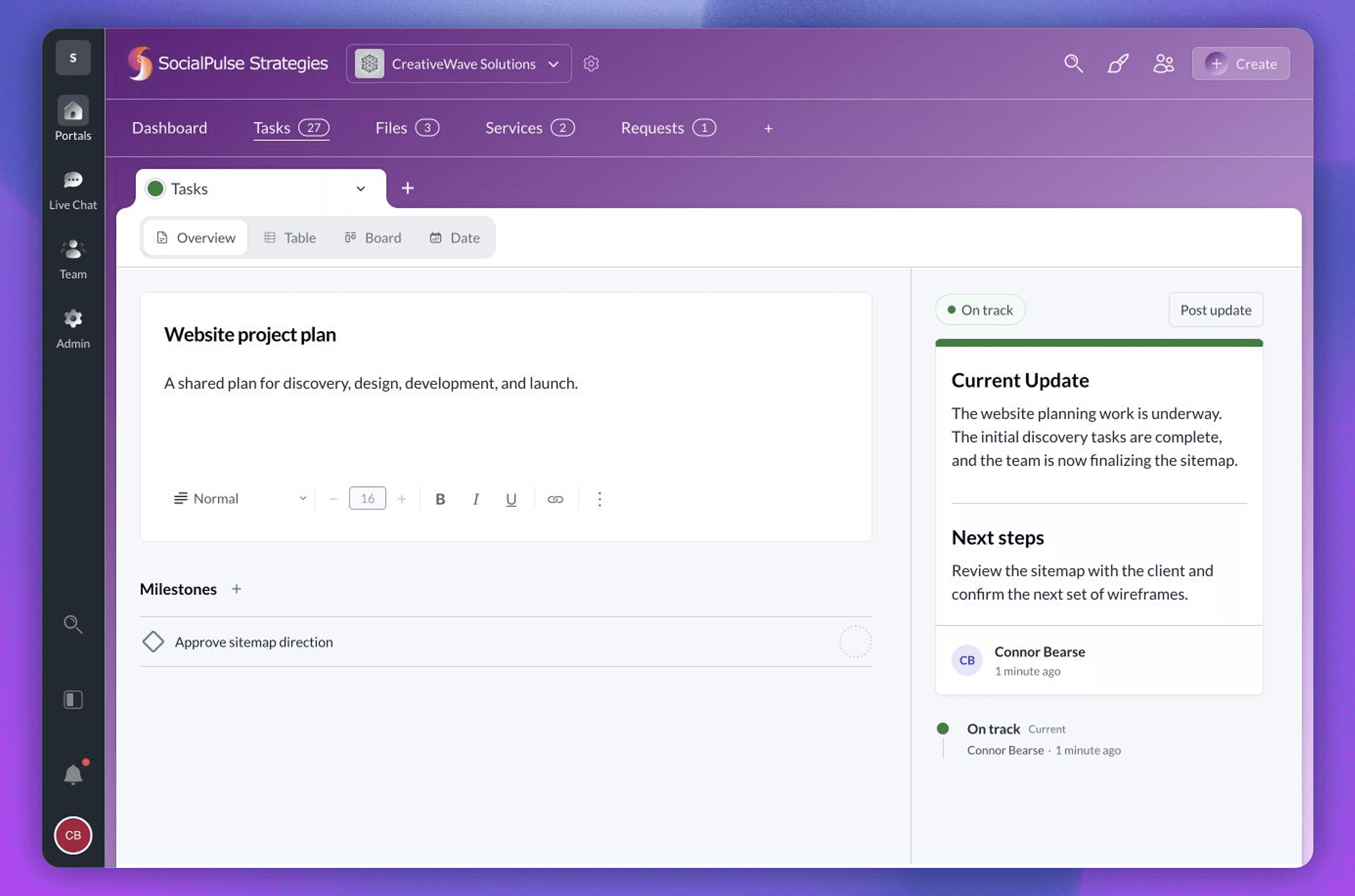
The team can hide Overview from clients when the board context is internal. When it is client-visible, use language that belongs in the relationship and keep private diagnosis in team-only work.
Review the update before you post it
Use five checks:
- Can the client identify the current status in the first few lines?
- Does the update explain an outcome rather than list effort?
- Does every next action have one owner?
- Is every decision request specific about timing and impact?
- Do the links open work that the intended client can access?
A status update is complete when the next reader knows what is true and what happens next. Use the Task Center and Board Health guide to review status across client accounts, and explore Sydnee Tasks when you are ready to keep the update beside the work.







