

Sydnee’s embed system makes it easier to bring compatible third-party tools into your client portals as dedicated pages.
When a provider offers compatible embed code, you can display its content inside the branded portal shell and adjust the surrounding page layout for desktop and mobile.
With this update, embedding tools is no longer just about dropping in code and hoping it works.
The visual builder lets you fine-tune the page presentation. The provider still controls how its content displays, who can access it, whether it needs a separate login, and which cookies or features it requires.
Why This Update Matters
Client portals should be the single source of truth for your customers – a place where they can access reports, dashboards, forms, schedules, and more.
Until now, embeds could be tricky to size, style, and protect.
This update gives you more control over the Sydnee page around compatible embedded content:
- Provider-ready setup – Paste trusted embed code supplied by the provider, then test that exact configuration.
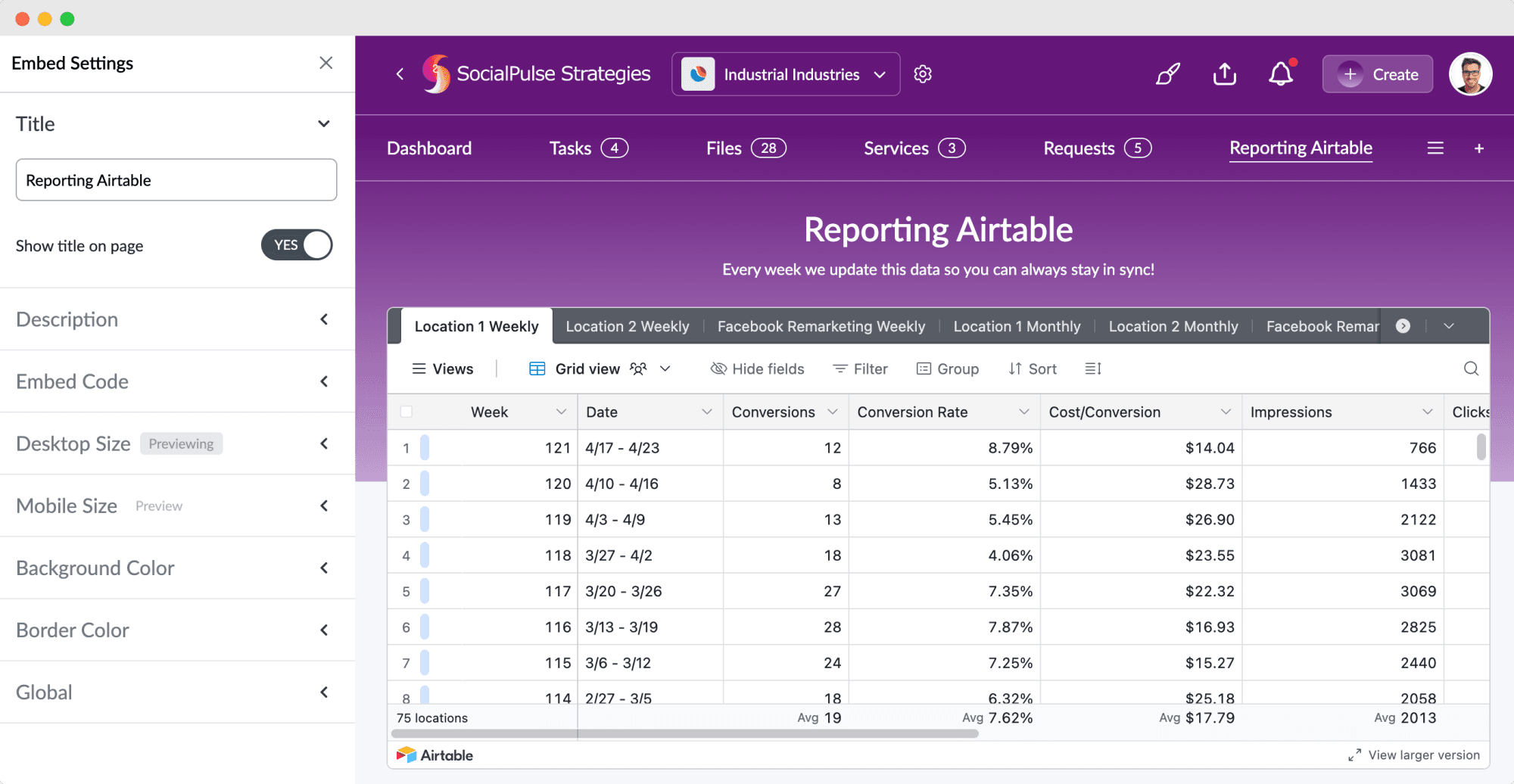
- Full control when needed – For those that don’t fit quite right, you can tweak width, height, background color, and border color with live previews.
- Mobile & desktop customization – Separate controls help you adapt the surrounding page for different screen sizes.
- Portal access point – Clients reach the page through your portal, while the provider continues to control its own authentication and sharing permissions.
Key New Features in Sydnee’s Embed System
Add a Compatible Tool as a Dedicated Portal Page
If a provider supplies embed code that works in the portal, click the plus icon in the top navigation, choose a platform for instructions or Custom Embed, and give the page a title. If the provider blocks embedding or works best in its own tab, add an External Link instead.
After you create the page, test it in the actual client portal before sharing it.
Live Visual Builder for Instant Previews
Preview the page presentation as you customize:
- Desktop Size – Choose Standard, Compact, or Custom (set custom width & height in px, vw, or vh).
- Mobile Size – Choose Standard, Compact, or Custom (custom height in px or vh; width is fixed for mobile).
- Background & Border Colors – Match your portal design or improve visibility for embeds that need contrast.
The preview helps you tune the layout. Open the saved page in the client portal to verify the provider’s authentication, sharing permissions, cookies, scrolling, responsive behavior, and current availability.
Cleaner Page Layouts
- Show/Hide Title on Page – Keep the title in navigation but remove it from the page to give more vertical space to your embed.
- Add a Description – Include optional subtext (max 120 characters) under your title for added context.
Global Embeds for All Accounts
Toggle the Global setting to display a page across all client accounts when the same provider content is appropriate for every client. Global availability in Sydnee does not change the provider’s permissions.
Portal Access and Provider Permissions
Clients open embedded pages from inside your Sydnee portal, but the embedded content remains a separate provider experience. Check the provider’s own sign-in and sharing settings before adding client data, and never paste passwords, private tokens, administrator links, or content that could expose one client’s information to another.
How to Add & Customize an Embed
- Click the “+” icon in your portal’s navigation bar.
- Select a provider shortcut (Airtable, Monday.com, YouTube, Figma, etc.) or choose Custom Embed for other trusted, compatible embed code.
- Enter your title and embed code.
- Click Create to add it as a page in your portal.
- Hit Edit Page to open the embed settings drawer.
- Use the visual builder to:
- Adjust desktop & mobile sizes
- Set background & border colors
- Show/hide the title
- Add a short description
- Preview the layout, save it, and open the actual client portal to test the provider content before sharing.
Real-World Uses for Sydnee’s Embed System
Here are a few examples of provider content you may be able to embed when compatible code is available:
- Project management boards – Monday.com, Asana, ClickUp
- Analytics dashboards – Looker Studio, Airtable, Google Sheets
- Scheduling tools – Calendly, Acuity
- Forms & surveys – Typeform, Google Forms
- Media content – YouTube, Vimeo, Loom videos
- Design previews – Figma, Canva
With this update, your client portal can provide one organized access point for compatible third-party resources, while each provider continues to manage its own content and access rules.
Why Your Clients Will Love It
Your clients get:
- One portal navigation for compatible tools and resources
- Desktop and mobile page layouts tuned for the client experience
- Your portal branding around content that keeps the provider’s own styles
- Fewer separate bookmarks for commonly used resources
- Clear access boundaries based on the provider’s authentication and sharing settings
Start Embedding Today
Sydnee’s embed system gives you a flexible way to bring compatible tools into one organized portal experience. Start with a trusted provider, use its published embed code, and test the client view before sharing it.
Review custom portal pages and external links, then log in, add a compatible embed, and confirm the finished experience in the client portal.







